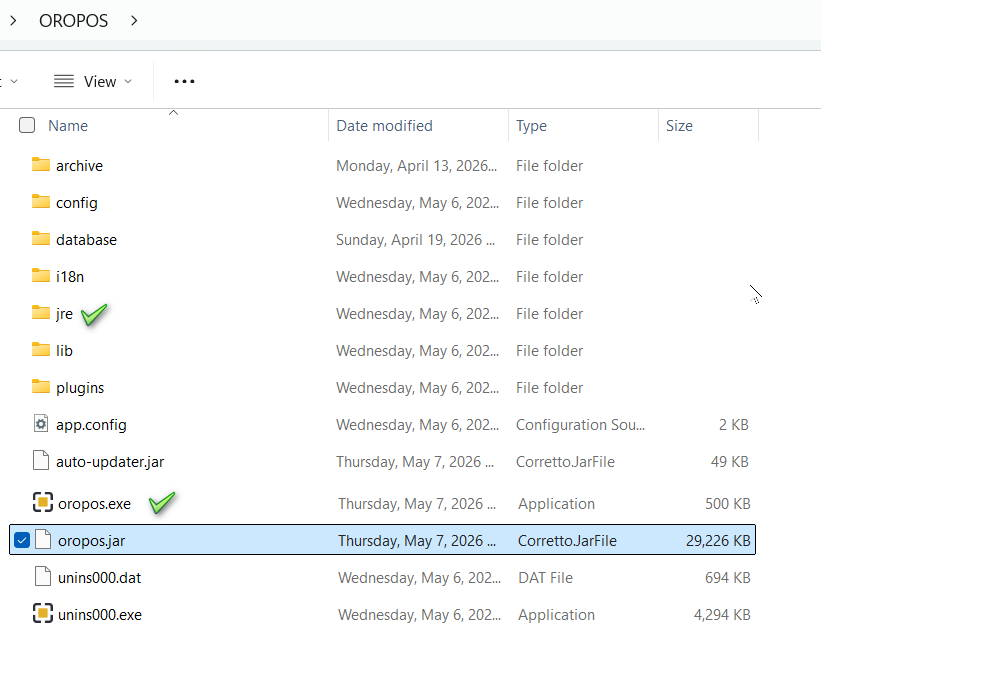
After extracting the downloaded ZIP file, here is what you will find inside the ORO POS folder and what each file does.
Key Files
oropos.jar
Main Application File
The core ORO POS application. Runs on all platforms — Windows, Mac, and Linux. This is the file that actually starts the POS system.
oropos.exe
Windows Launcher Windows only
Double-click to start ORO POS on Windows. It simply loads oropos.jar in the background.
Mac and Linux users can safely delete this file. Use java -jar oropos.jar from a terminal instead.
oropos.sh
Shell Script Mac & Linux
Alternative launcher for Mac and Linux. Give it execute permission and run ./oropos.sh from a terminal.
jre/
Java Runtime Environment
Bundled Java runtime. When this folder is present, ORO POS uses it automatically — no separate Java installation required.
plugins/
Optional Add-on Modules
Contains optional modules — Floor Plan, Inventory, and Customer. Delete any plugin folder you don’t need before launching, or choose Default mode at startup to skip all plugins.
database/
Built-in Database
Built-in Derby database pre-loaded with sample store data so you can test immediately after installation.
Windows users — Check for JRE: Make sure your folder contains a jre folder. If it is missing, download ORO POS bundled with Java JRE or install Oracle Java 8 separately.