


📖 Recipe / Bill of Materials (BoM)
A Recipe tells ORO POS what raw materials are used to make a finished product. When you sell that product, the system automatically deducts the ingredients from your inventory. No more manual stock counting after every sale.
If you sell a Burger, the recipe says “use 1 patty + 1 bun + 1 slice of cheese”. When the burger is sold, those 3 items drop from stock automatically.

🍳 What is a Recipe in POS?
A recipe is just a list of ingredients + quantities + notes. ORO POS uses it to:
- 📊 Track exactly what raw materials each finished item uses
- 🔄 Automatically deduct ingredients when an item is sold
- 📈 Calculate accurate cost per dish
- 🛒 Trigger reorder alerts when ingredients run low
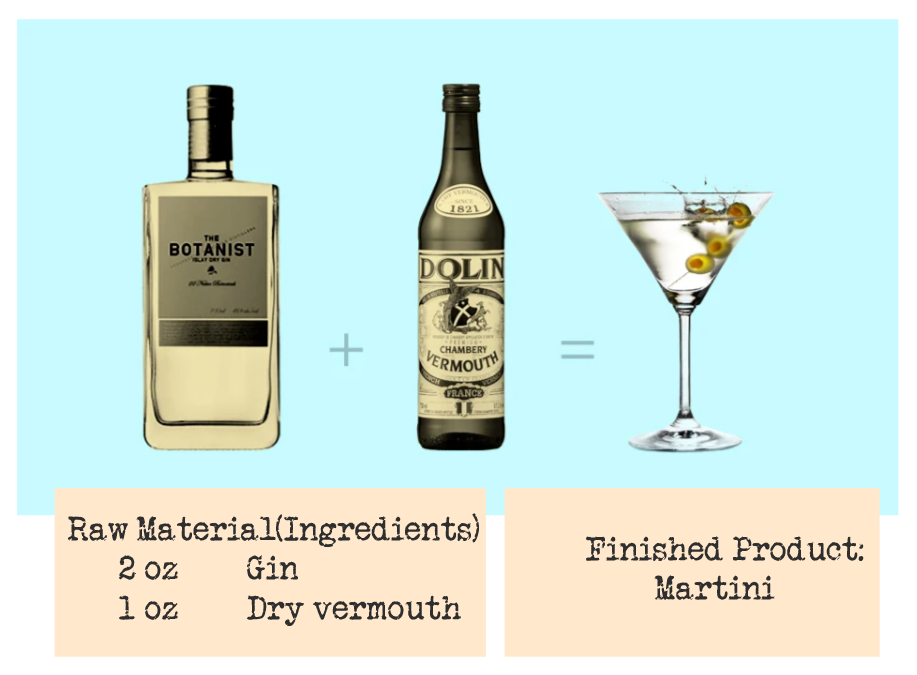
📌 Example: Classic Martini Recipe
| Ingredient | Quantity | Unit |
|---|---|---|
| 🍸 Gin | 2.5 | oz |
| 🍷 Dry Vermouth | 0.5 | oz |
| 🫒 Olive (garnish) | 1 | piece |
⚙️ Prerequisites Before Creating a Recipe
Before creating a recipe, you must already have:
| Need | Why |
|---|---|
| 🍔 Finished Item (the product you sell) | e.g., “Martini” — the menu item customers order |
| 🌾 Raw Materials (ingredients) | Gin, Dry Vermouth, Olive — created as inventory items |
| 📏 Units of Measurement | oz, ml, gram, piece — defined in Unit Groups |
Read these first if needed:
🍴 The 2 Types of Recipes
| Type | Where Defined | Best For |
|---|---|---|
| 🍔 Default Recipe in Item | Inside menu item edit form | Per-item recipes (Burger, Pizza, Cocktail) |
| 🍲 Independent Recipe | Inventory → Recipe | Bulk batches (3 gallons of soup) |
🍔 Type 1: Default Recipe in Item
A recipe attached directly to a menu item. Every time the item sells, ingredients drop from stock.
📌 Real Example: Cheeseburger
| Ingredient | Per Burger |
|---|---|
| 🍞 Bun | 1 piece |
| 🥩 Beef Patty | 1 piece (4 oz) |
| 🧀 Cheese Slice | 1 piece |
| 🥬 Lettuce | 10 g |
| 🍅 Tomato | 15 g |
| 🟡 Mustard | 5 ml |
Sell 1 burger → all 6 ingredients deduct automatically.
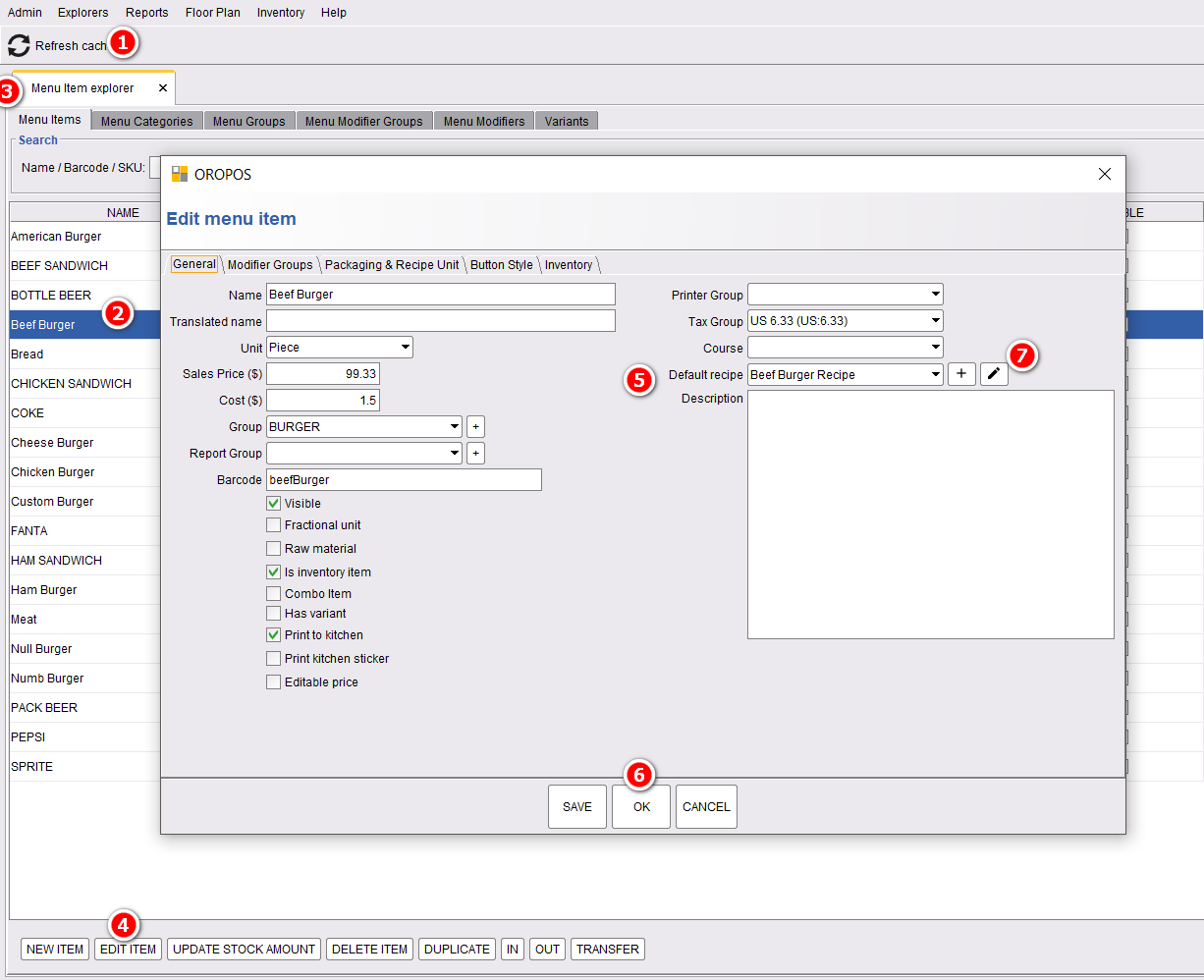
How to Set It Up
Path: Back-Office → Explorers → Menus & Others → (Select Item) → Edit → Recipe Tab
🍲 Type 2: Independent Recipe (Batch Cooking)
A recipe that produces a large quantity in one go. Useful for soups, sauces, marinades, doughs — things you make in batches and serve from later.
📌 Real Example: Chicken Soup (3-gallon batch)
| Ingredient | For 3-Gallon Batch |
|---|---|
| 🍗 Chicken (cooked, diced) | 5 lb |
| 🥕 Carrots (chopped) | 2 lb |
| 🧅 Onions | 1.5 lb |
| 🌿 Celery | 1 lb |
| 🍜 Egg Noodles | 2 lb |
| 🥣 Chicken Stock | 3 gallons |
| 🌶️ Salt + Spices | to taste |
How to Create
Path: Back-Office → Inventory → Recipe → Create New
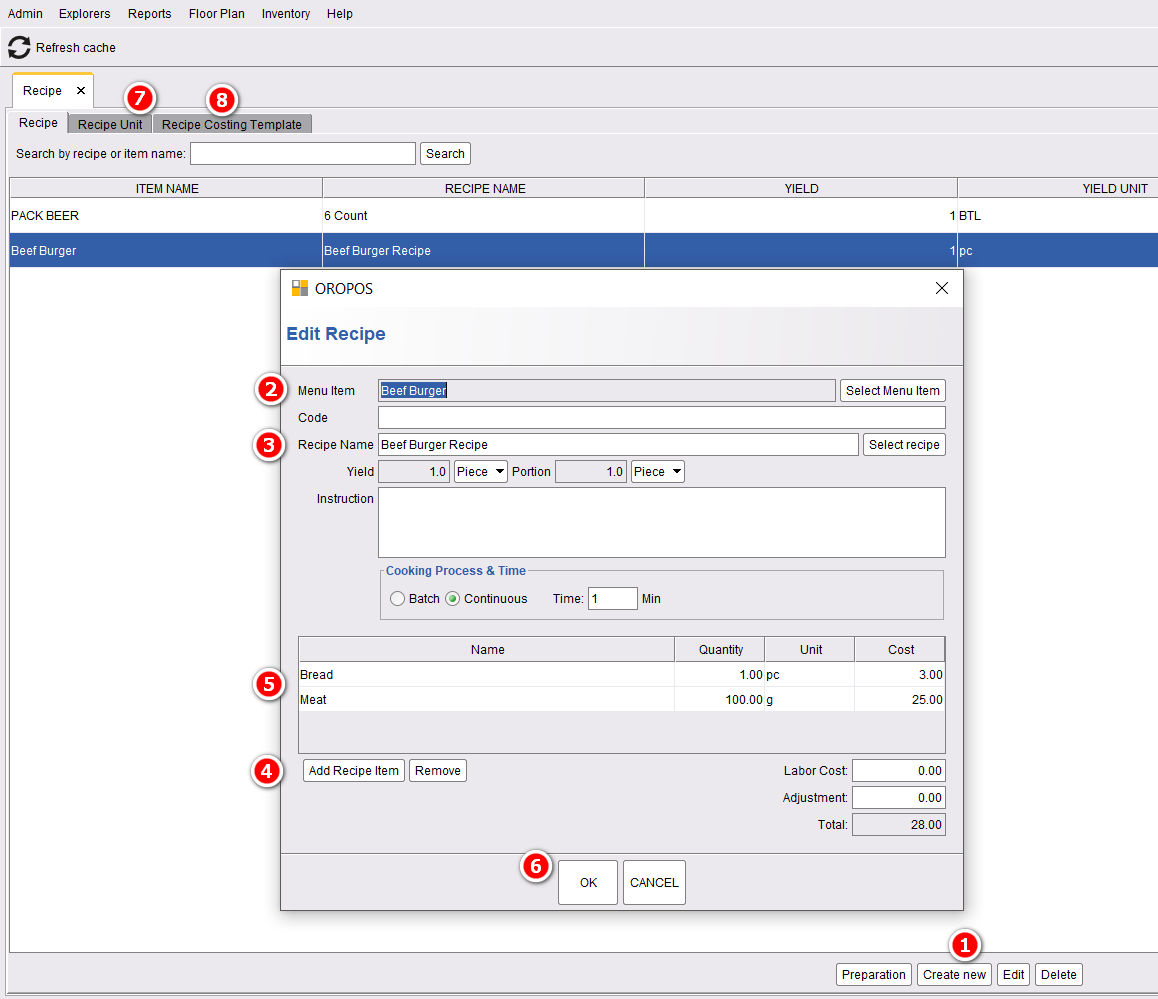
| Step | Action |
|---|---|
| 1 | Choose the menu item the recipe is for |
| 2 | Name the recipe (free-form name or code) |
| 3 | Add recipe items (ingredients) |
| 4 | Click each quantity, type the value, press Enter |
| 5 | Press Ok to save the recipe |
⚖️ Yield vs Portion (Important!)
| Term | What It Means |
|---|---|
| 📦 Yield | How much the recipe makes (total) |
| 🥣 Portion | How much you serve to one person |
📌 Real Example: Minestrone Soup
- 📦 Yield: 3 gallons (= 384 fl oz total)
- 🥣 Portion (cup): 8 fl oz
- 🥣 Portion (bowl): 12 fl oz
How many servings?
- Cups: 384 ÷ 8 = 48 cups
- Bowls: 384 ÷ 12 = 32 bowls
🔄 Automatic Deduction in Action
Once a recipe is set, ingredients deduct automatically. Here’s the magic:
📌 Live Example: Selling 5 Cheeseburgers
Stock before sale:
| Ingredient | In Stock |
|---|---|
| Buns | 100 |
| Patties | 80 |
| Cheese Slices | 120 |
5 burgers sell at lunch.
Stock after — automatic deduction:
| Ingredient | Used | Remaining |
|---|---|---|
| Buns | 5 | 95 |
| Patties | 5 | 75 |
| Cheese Slices | 5 | 115 |
No manual counting. No “I think we need to order more buns soon.” It’s all tracked.
💼 More Real-World Examples
📌 Example 1: Coffee Shop — Cappuccino
| Ingredient | Quantity |
|---|---|
| Espresso (ground coffee) | 18 g |
| Milk | 120 ml |
| Cup (12 oz) | 1 piece |
| Lid | 1 piece |
1 cappuccino sale → all 4 items drop. End-of-day shows you sold 200 cups + how much coffee you used.
📌 Example 2: Pizzeria — Margherita Pizza
| Ingredient | Quantity |
|---|---|
| Pizza Dough | 8 oz |
| Tomato Sauce | 3 oz |
| Mozzarella | 4 oz |
| Fresh Basil | 3 leaves |
| Olive Oil | 5 ml |
📌 Example 3: Bar — Mojito (Independent Batch)
Bar pre-mixes a 1-gallon batch of Mojito mix:
| Ingredient | For 1 Gallon (128 oz) |
|---|---|
| White Rum | 32 oz |
| Lime Juice | 24 oz |
| Mint Leaves | 100 leaves |
| Simple Syrup | 16 oz |
| Sparkling Water | 56 oz |
- Yield: 1 gallon (128 oz)
- Portion: 8 oz per glass
- Servings: 16 mojitos per batch
⭐ Best Practices
| Tip | Why |
|---|---|
| Set up units first (oz, ml, g) | Without units, recipes can’t measure ingredients |
| Mark ingredients as Raw Material | Only raw materials can be added to recipes |
| Be realistic with quantities | Account for shrinkage, spillage, taste-tests |
| Update recipes when menu changes | Old recipes can cause wrong stock counts |
| Use Independent Recipes for batch items | Soup, sauces, marinades — items made in bulk |
| Use Default Recipes for à-la-carte items | Burgers, pizzas, drinks — made on demand |
📚 Related Guides
| → Products & Items | → Unit Types | → Stock Conversion |
📞 Need More Help?
Visit our knowledge base at guide.orocube.com or contact support at helpdesk@orocube.net