

💼 Opening and Closing Server / Staff Bank
In a busy restaurant, some trusted employees are allowed to bypass the cash drawer and manage their own cash. They keep cash in a bag, apron pocket, or money belt. This is called a Server Bank or Staff Bank. Common for servers, bartenders, and delivery drivers.
Cash drawer = shared till for whole terminal. Staff bank = one employee’s personal till they carry around.
🎯 Why Use Staff Banks?
| Situation | Why Staff Bank Helps |
|---|---|
| 🍴 Server roams between tables, terminal, kitchen | Carries cash bag — no need to walk back to drawer |
| 🚗 Delivery driver leaves the store | Cash collected on delivery stays with driver until return |
| 🍻 Bartender splits tips by shift | Their tips and sales tracked separately |
| 👥 Multiple employees on one terminal | Each accountable for their own cash |
| ⚡ High-volume rush, no time to share drawer | Each server handles their own transactions |
👀 Visual: The Staff Bank Concept
💵
CASH DRAWER
Lives at the terminal
Shared by all cashiers
Counter service
e.g., Cash register
💼
STAFF BANK
Walks with the employee
One person’s responsibility
Table service / Delivery
e.g., Server’s apron, driver’s bag
👥 Multi-Role Employees in ORO POS
An employee in ORO POS can have multiple roles — and at clock-in time, they pick which role to work. Each role can have different staff bank rules.
📌 Real Example
Manual M (the employee in the screenshot) has 3 roles:
- 👔 Manager — Has Staff Bank: Yes (Manual)
- 💵 Cashier — Uses cash drawer
- 🍽️ Server — Has Staff Bank: Yes (Auto)
Each shift, Manual picks which role he’s working today.
⚙️ Auto vs Manual Staff Bank
If a role has staff bank enabled, the bank can auto-open at clock-in or be opened manually.
| Mode | What Happens at Clock-In | Best For |
|---|---|---|
| ⚡ Auto Start Staff Bank | Bank opens automatically when employee clocks in | Servers, drivers — staff bank always required |
| 🖐️ Manual Staff Bank | After clock-in, employee chooses to start bank OR use drawer | Managers/flexible roles — bank only when needed |
🔓 Opening: Manual Staff Bank Flow
Here’s the complete flow when an employee with Manual Staff Bank clocks in.
📌 The Profile
Employee profile shows:
- ✅ has staff bank: Yes
- ❌ auto start staff bank: No ← Manual mode
📌 Step-by-Step
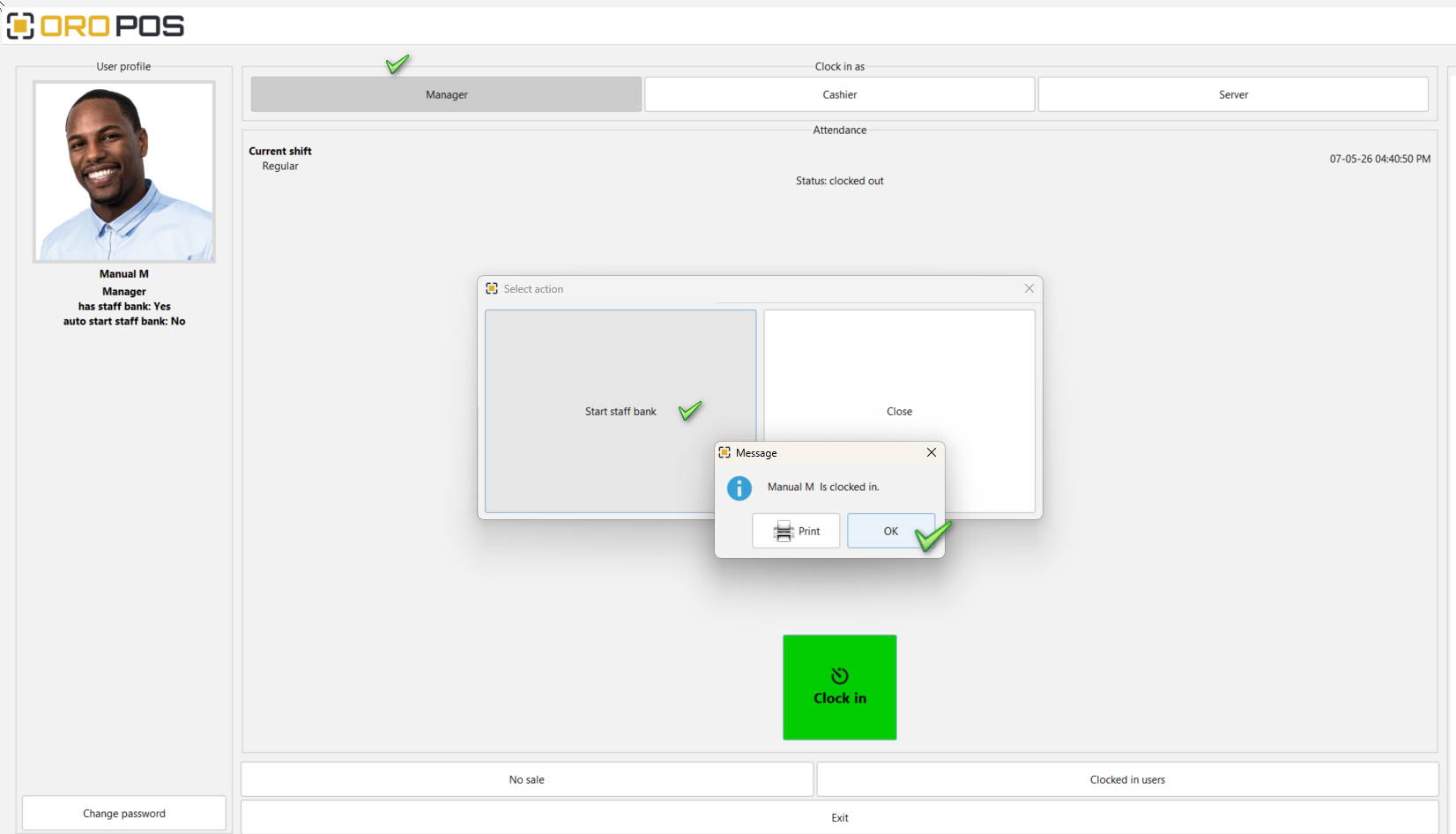
Manual staff bank: choose role → clock in → select Start Staff Bank → confirm
| Step | Action |
|---|---|
| 1 | Employee logs in to ORO POS |
| 2 | Picks the role at top: Manager / Cashier / Server |
| 3 | Tap green Clock In button |
| 4 | A “Select action” dialog appears with two options |
| 5 | Tap Start Staff Bank (or Close to skip) |
| 6 | Confirmation: “Manual M is clocked in” |
| 7 | Tap Print to print clock-in chit, or OK to continue |
If the employee skips “Start Staff Bank”, their cash sales will go to the main cash drawer instead. They can also start their bank later from the clock-in screen.
🛒 During the Shift
While the staff bank is open, all cash transactions go into that employee’s bank:
| Activity | Bank Effect |
|---|---|
| 💵 Customer pays cash | Cash goes to server’s bank |
| 💳 Customer pays card | Tracked in card receipts (no cash impact) |
| 💸 Tip received (cash) | Server keeps it (or splits per shop policy) |
| ↩️ Cash refund | Comes out of server’s bank |
📊 Checking Staff Bank Status (Mid-Shift)
The employee can check their bank status anytime from the clock-in screen.
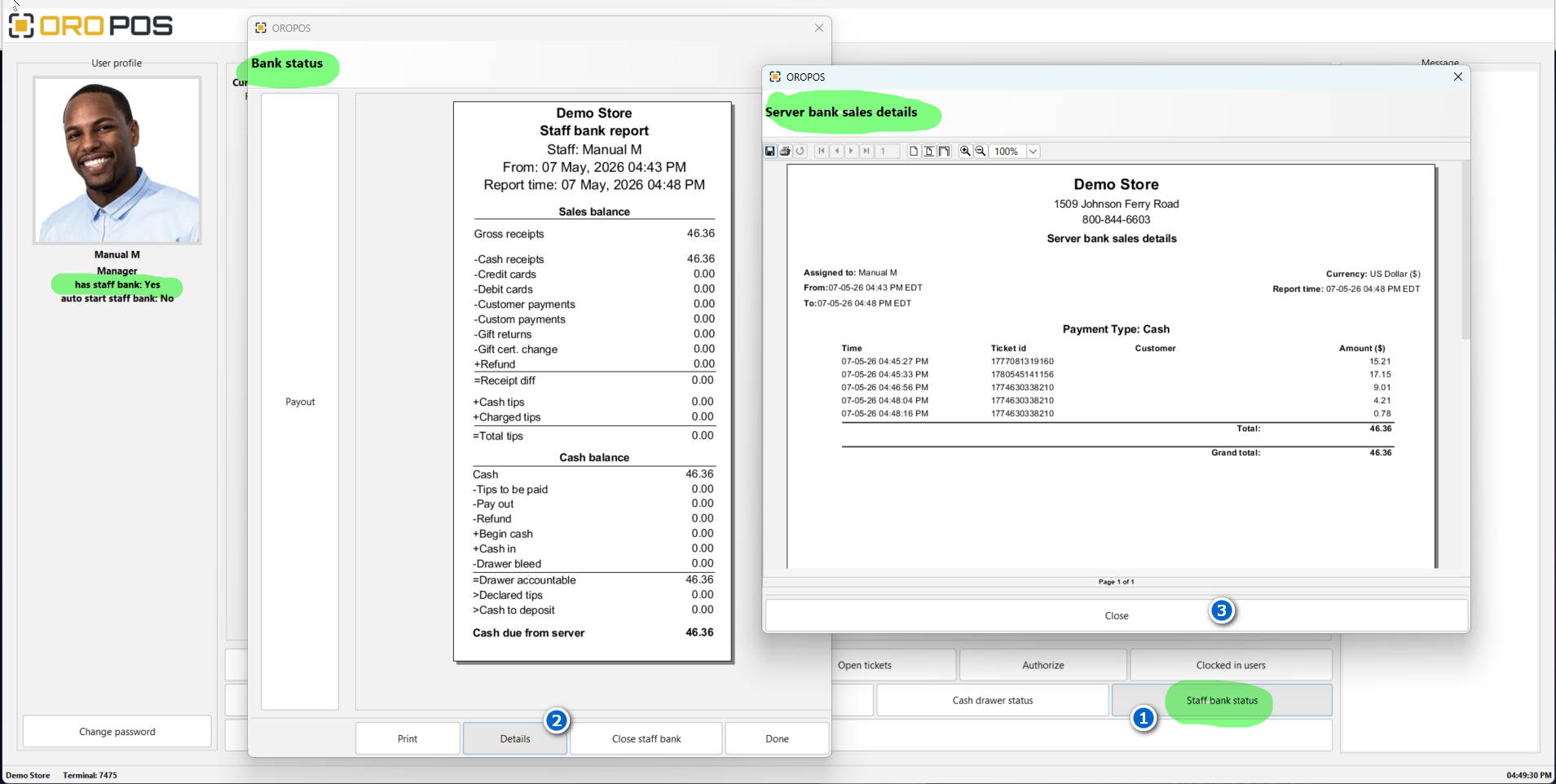
1️⃣ Staff bank status button → 2️⃣ Details → 3️⃣ Server bank sales details
| Step | What to Click | Sees |
|---|---|---|
| 1️⃣ | Staff bank status button (bottom right) | Bank summary report |
| 2️⃣ | Details button | Per-transaction breakdown |
| 3️⃣ | Close the popup | Returns to clock-in screen |
🔒 Closing the Staff Bank
At end of shift, employee closes their bank, declares tips, and hands cash to the supervisor.
| Step | Action |
|---|---|
| 1 | From clock-in screen → tap Staff bank status |
| 2 | Review the report (sales balance + cash balance) |
| 3 | Tap Close staff bank |
| 4 | Declare tips (if applicable) |
| 5 | Print final Staff Bank Report |
| 6 | Hand cash + report to supervisor |
📋 Staff Bank Report Walkthrough
Here’s the report from the screenshot — Manual M’s Staff Bank Report:
Demo Store — Staff bank report
Staff: Manual M | From: 07 May 2026 04:43 PM | Report time: 04:48 PM
| 📊 Sales Balance | |
|---|---|
| Gross receipts | $46.36 |
| – Cash receipts | $46.36 |
| – Credit cards | $0.00 |
| – Debit cards | $0.00 |
| – Customer payments | $0.00 |
| + Cash tips | $0.00 |
| + Charged tips | $0.00 |
| = Total tips | $0.00 |
| 💰 Cash Balance | |
| Cash | $46.36 |
| – Tips to be paid | $0.00 |
| – Pay out | $0.00 |
| – Refund | $0.00 |
| + Begin cash | $0.00 |
| + Cash in | $0.00 |
| = Drawer accountable | $46.36 |
| > Declared tips | $0.00 |
| > Cash to deposit | $0.00 |
| Cash due from server | $46.36 |
Manual must hand over $46.36 cash to the supervisor.
📋 Server Bank Sales Details (Per-Transaction)
Click “Details” to see every transaction:
Server bank sales details
Assigned to: Manual M | Payment Type: Cash
| Time | Ticket ID | Amount |
|---|---|---|
| 07-05-26 04:45:27 PM | 1777081319160 | $15.21 |
| 07-05-26 04:45:33 PM | 1780545141156 | $17.15 |
| 07-05-26 04:46:56 PM | 1774630338210 | $9.01 |
| 07-05-26 04:48:04 PM | 1774630338210 | $4.21 |
| 07-05-26 04:48:16 PM | 1774630338210 | $0.78 |
| Total → | $46.36 | |
💼 Real-World Use Cases
🍴 Full-Service Restaurant — Servers
5 servers, each with auto-staff-bank. Each carries cash bag, takes orders, settles at the table. End of shift each closes their bank → declares tips → deposits cash with manager.
🚗 Pizza Delivery Drivers
Driver clocks in → bank auto-opens. Takes deliveries with cash on delivery. Returns to store, more deliveries. End of shift → closes bank → cash + tips reconciled.
👔 Manager (Manual Mode)
Manager mostly oversees. Sometimes covers cashier role. Manual staff bank means they only open one when needed. Otherwise uses the main drawer.
🍻 Bartender
Bartender handles drinks + tabs + tips. Personal staff bank tracks all their sales. End of shift, accountable for the cash collected.
🎪 Event Vendor
Multiple vendors at festival. Each one has their own bank (no shared drawer). Reports per vendor.
⭐ Best Practices
| Tip | Why |
|---|---|
| Use auto-staff-bank for servers/drivers | Always required — no chance to forget |
| Use manual staff-bank for managers/admins | Flexibility — only when actually handling cash |
| Train staff to check status mid-shift | Catch missing transactions early |
| Always declare tips before closing | Required for IRS reporting + correct cash deposit |
| Print and sign staff bank report at handover | Audit trail and accountability |
| Investigate variance from “Cash due” | Identify shortages or theft early |
| Set staff bank permission only for trusted roles | Not everyone should bypass the cash drawer |
📚 Related Guides
| → Opening / Closing Cash Drawer | → Store Sessions Guide | → Tips Payout |
📞 Need More Help?
Visit guide.orocube.com or contact helpdesk@orocube.net