

📊 Understanding Gross Receivable, Receipt Differential & Tips Differential
When you close a store session, ORO POS shows three numbers that confuse a lot of owners: Gross Receivable, Receipt Differential, and Tips Differential. They all relate to unpaid amounts — but in different ways.
- 📋 Gross Receivable = total of all open tickets (full amount)
- 💸 Receipt Differential = how much money is still owed on those tickets
- 💰 Tips Differential = tips collected but not yet paid out to employees
📋 Gross Receivable
The full amount of every ticket that’s open (not yet fully paid) at the time the store session closed.
📌 Real Example
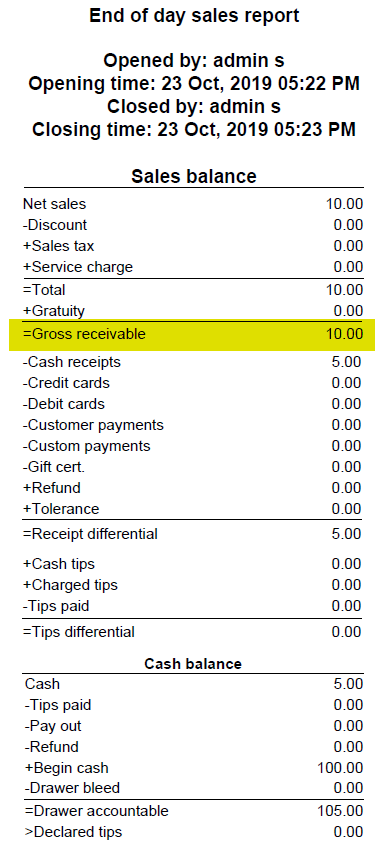
A $10 ticket is opened. Customer pays $5 cash, leaves saying “I’ll pay the rest later”. Manager closes the store.
| Field | Amount |
|---|---|
| Ticket Total | $10.00 |
| Paid So Far | $5.00 |
| Gross Receivable | $10.00 (full amount!) |
Gross Receivable shows the full ticket amount, NOT just the unpaid portion. Even though the customer paid $5, gross receivable still shows $10 because the ticket is still open.
💸 Receipt Differential
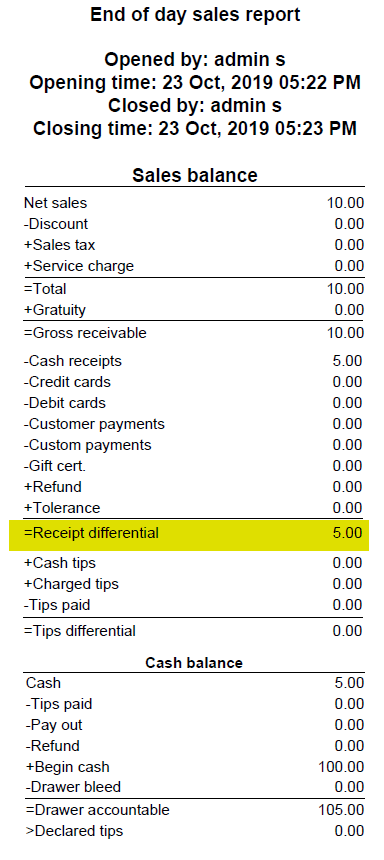
The unpaid portion of open tickets at session close. Money you’re still owed.
📌 Same Example: $10 Ticket, $5 Paid
| Field | Amount |
|---|---|
| Ticket Total | $10.00 |
| Paid So Far | $5.00 |
| Receipt Differential | $5.00 (the unpaid balance) |
If the customer hadn’t paid anything, Receipt Differential would be $10.00.
🆚 Gross Receivable vs Receipt Differential
| Scenario | Gross Receivable | Receipt Differential |
|---|---|---|
| $10 ticket, paid $0 | $10 | $10 |
| $10 ticket, paid $5 | $10 | $5 |
| $10 ticket, paid $10 (closed) | $0 | $0 |
💰 Tips Differential
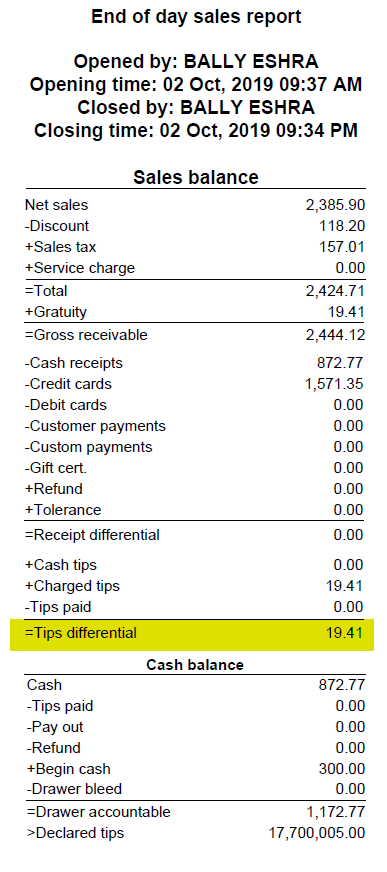
Tips collected from customers but not yet paid out to employees by end of session.
🎯 The Goal
Best practice: pay all tips to employees before closing the store. Then your report shows “Tips Paid = $X” and “Tips Differential = $0”.
📌 Real Example
During the day, customers tipped $80 total. Manager forgot to distribute tips to servers before closing.
| Field | Amount |
|---|---|
| Charged Tips (collected) | $80.00 |
| Tips Paid (to employees) | $0.00 |
| Tips Differential | $80.00 (still owed to staff!) |
📌 Partial Payout Example
Manager paid $50 to staff, forgot the rest before closing.
| Field | Amount |
|---|---|
| Charged Tips | $80.00 |
| Tips Paid | $50.00 |
| Tips Differential | $30.00 (remaining unpaid) |
🎬 Full Worked Example: One Day at a Restaurant
End-of-day at “Joe’s Diner”:
- Total sales: $850 across 50 tickets
- 48 tickets fully paid → $810
- 1 ticket open, $20 total, customer paid $10 (will return tomorrow)
- 1 ticket open, $20 total, customer didn’t pay (left tab)
- Tips collected: $120
- Tips paid out to staff: $90 (forgot to distribute the rest)
| Report Line | Calculation | Amount |
|---|---|---|
| Total Sales | All tickets summed | $850 |
| Gross Receivable | $20 + $20 (full open ticket totals) | $40 |
| Receipt Differential | $10 unpaid + $20 unpaid | $30 |
| Charged Tips | All tips collected | $120 |
| Tips Paid | Distributed to staff | $90 |
| Tips Differential | $120 – $90 | $30 |
📍 How to Find These in Reports
| Step | Action |
|---|---|
| 1 | Open Back-Office |
| 2 | Go to Explorer → Store Session History |
| 3 | Find the latest session → click Summary |
| 4 | Look for the 3 differential lines |
⭐ Best Practices
| Tip | Why |
|---|---|
| Close all tickets before closing the store | Keeps Gross Receivable & Receipt Differential at $0 |
| Pay tips to staff before closing | Tips Differential should always be $0 |
| If Differentials are not $0, investigate why | Helps catch unpaid tickets, walked-out customers, or missed payouts |
| Use House Account for “I’ll pay later” tabs | Shifts the receivable to a customer balance instead of leaving open |
📚 Related Guides
| → Store Sessions | → Session Summary | → Tips Payout |
📞 Need More Help?
Visit guide.orocube.com or contact helpdesk@orocube.net