

🍽️ Setting Up Meal Courses
Course-based ordering is what separates a fine-dining experience from a fast-food rush. Instead of every dish hitting the kitchen at once, the server sends courses in sequence — appetizers first, then entrées, then dessert. Customers eat at the right pace, kitchen stays organized, and the meal feels like a real dining experience.
Without courses: Salad arrives with the steak. Customer rushes. Kitchen overwhelmed.
With courses: Salad first → eat → entrée arrives → dessert at the end. Smooth, paced, professional.
🎯 Why Meal Courses Matter
| Without Courses | With Courses |
|---|---|
| 😩 All dishes arrive at once | 😊 Dishes arrive in proper sequence |
| 🥶 Steak goes cold while customer eats salad | 🔥 Steak hits the table hot, just when needed |
| 😵 Kitchen overwhelmed (everything at once) | 😌 Kitchen paced — appetizers, then entrées |
| ⏱️ Customer rushed, not enjoying | 🍷 Customer enjoys the pace, orders more wine |
| 📉 Lower table turnover quality | 📈 Higher avg ticket (drinks, dessert) |
| 😞 Looks unprofessional | ⭐ Feels like a real dining experience |
🍴 Example Course Structures
📌 Classic American Restaurant (4 Courses)
| # | Course | Examples |
|---|---|---|
| 1️⃣ | 🥗 Appetizers | Caesar Salad, Soup, Wings |
| 2️⃣ | 🥩 Entrées | Steak, Pasta, Burger, Fish |
| 3️⃣ | 🍰 Desserts | Cheesecake, Ice Cream, Brownie |
| 4️⃣ | ☕ Drinks/After-meal | Coffee, Tea, Liqueur |
📌 Fine-Dining French (5 Courses)
| # | Course | Examples |
|---|---|---|
| 1️⃣ | 🥖 Amuse-bouche | Tiny pre-meal bite from chef |
| 2️⃣ | 🥗 Hors d’œuvre / Entrée | Foie gras, escargot, salad |
| 3️⃣ | 🍲 Soup / Fish course | Bisque, sole meunière |
| 4️⃣ | 🥩 Plat principal | Beef Bourguignon, Duck |
| 5️⃣ | 🧀 Cheese / Dessert | Cheese plate, crème brûlée |
📌 Italian Restaurant (3 Courses)
| # | Course | Examples |
|---|---|---|
| 1️⃣ | 🫒 Antipasti | Bruschetta, charcuterie, caprese |
| 2️⃣ | 🍝 Primi / Secondi | Pasta, risotto, osso buco |
| 3️⃣ | 🍰 Dolce | Tiramisu, gelato, cannoli |
📌 Steakhouse (3 Courses)
| # | Course | Examples |
|---|---|---|
| 1️⃣ | 🦐 Starters | Shrimp Cocktail, Wedge Salad |
| 2️⃣ | 🥩 Mains + Sides | Ribeye, Filet, Mac & Cheese, Asparagus |
| 3️⃣ | 🍨 Desserts | Crème Brûlée, Chocolate Cake |
💪 How Course Setup Helps Your Restaurant
| Benefit | Why It Matters |
|---|---|
| ⏱️ Better timing | Each course arrives at the right moment |
| 🔥 Hot food stays hot | Entrées don’t sit waiting while appetizers are eaten |
| 🍳 Kitchen organized | Chef cooks appetizers first, mains second — no chaos |
| 💸 Higher avg check | More time at table = more drinks, desserts ordered |
| ⭐ Better reviews | “Great pacing” appears in 5-star reviews |
| 😊 Server confidence | Professional flow, no rushed deliveries |
| 📋 Train new staff faster | System enforces the pacing — server just follows |
1️⃣ Step 1: Create Your Courses
Path: Back-Office → Explorers → Course → Set Up Courses
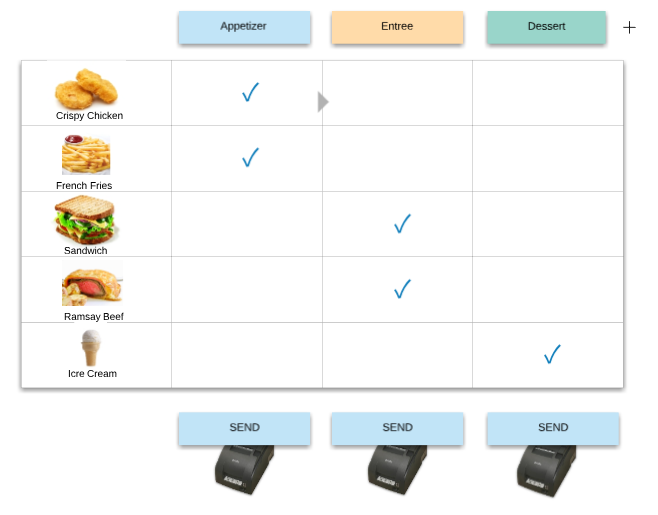
Meal Course Overview
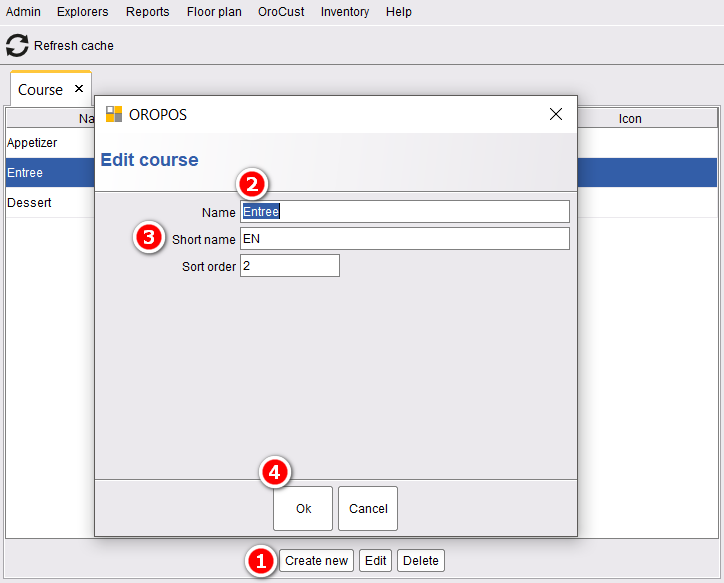
Add as many courses as your style of dining requires. Common setups:
- 3-course (Appetizer, Main, Dessert)
- 4-course (+ Drinks)
- 5-course or more (Fine dining)
2️⃣ Step 2: Enable in Your Order Type
Path: Back-Office → Order Type → (Edit Dine-In) → Enable Course-Based Order → Save → Restart POS
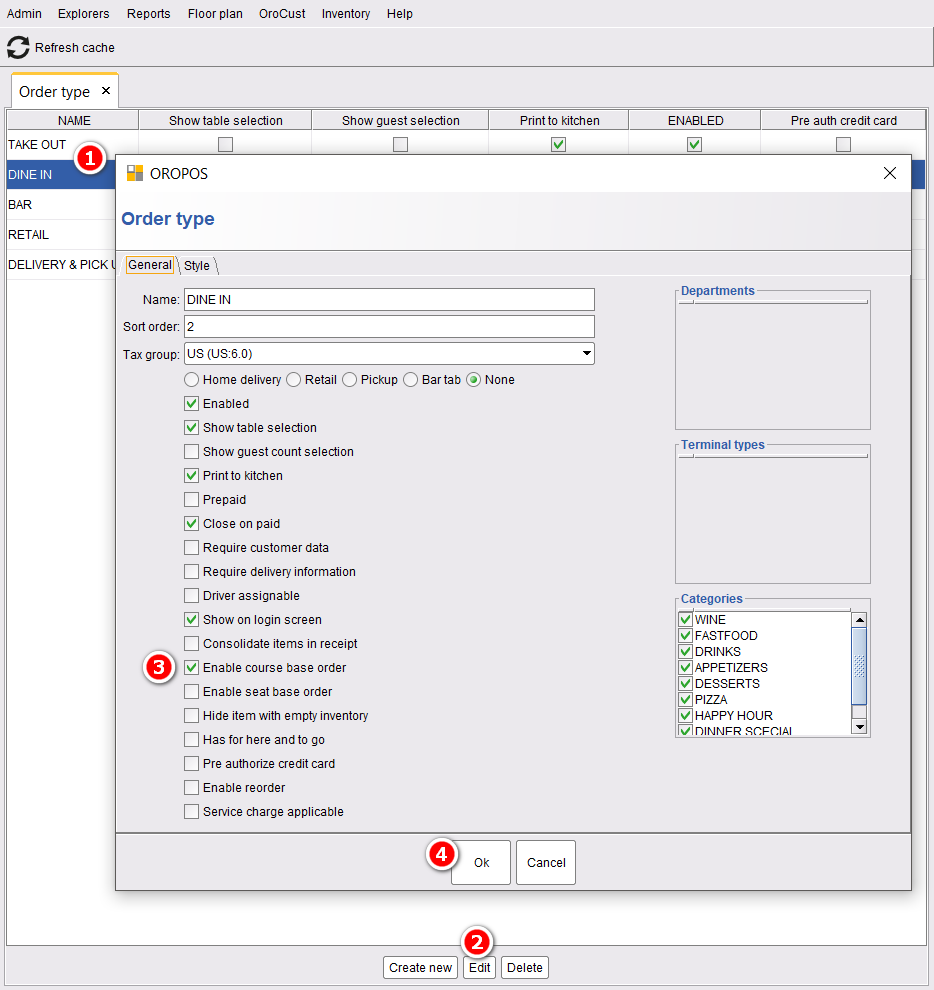
Usually only on Dine-In order types. Take Out, Delivery, and Drive-Thru don’t need course pacing.
3️⃣ Step 3: Assign Items to Courses
Path: Back-Office → Explorers → (Select Item) → Edit → Select Course
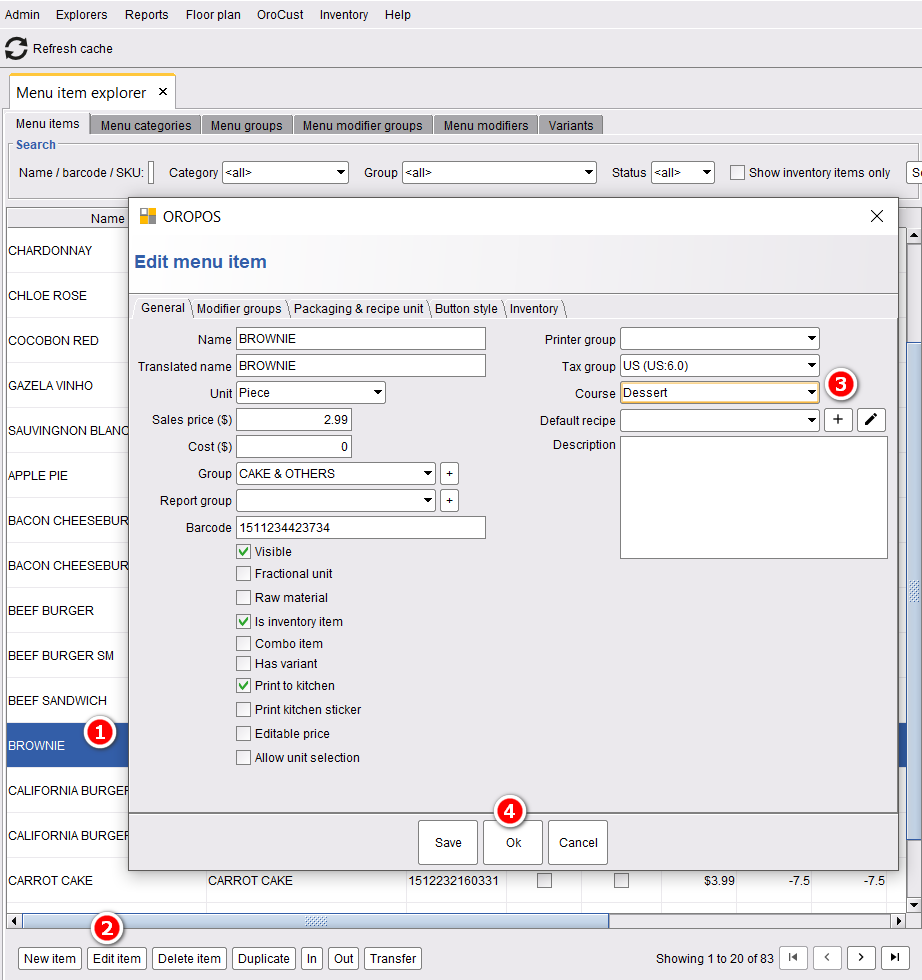
📌 Example Assignment
| Menu Item | Assigned Course |
|---|---|
| Caesar Salad | 🥗 Appetizer |
| Tomato Soup | 🥗 Appetizer |
| Ribeye Steak | 🥩 Entrée |
| Pasta Carbonara | 🥩 Entrée |
| Chocolate Cake | 🍰 Dessert |
| Espresso | ☕ Drinks |
4️⃣ Step 4: Take a Course-Based Order
When the server takes the order, all menu items go onto the ticket. They’re automatically grouped by course.
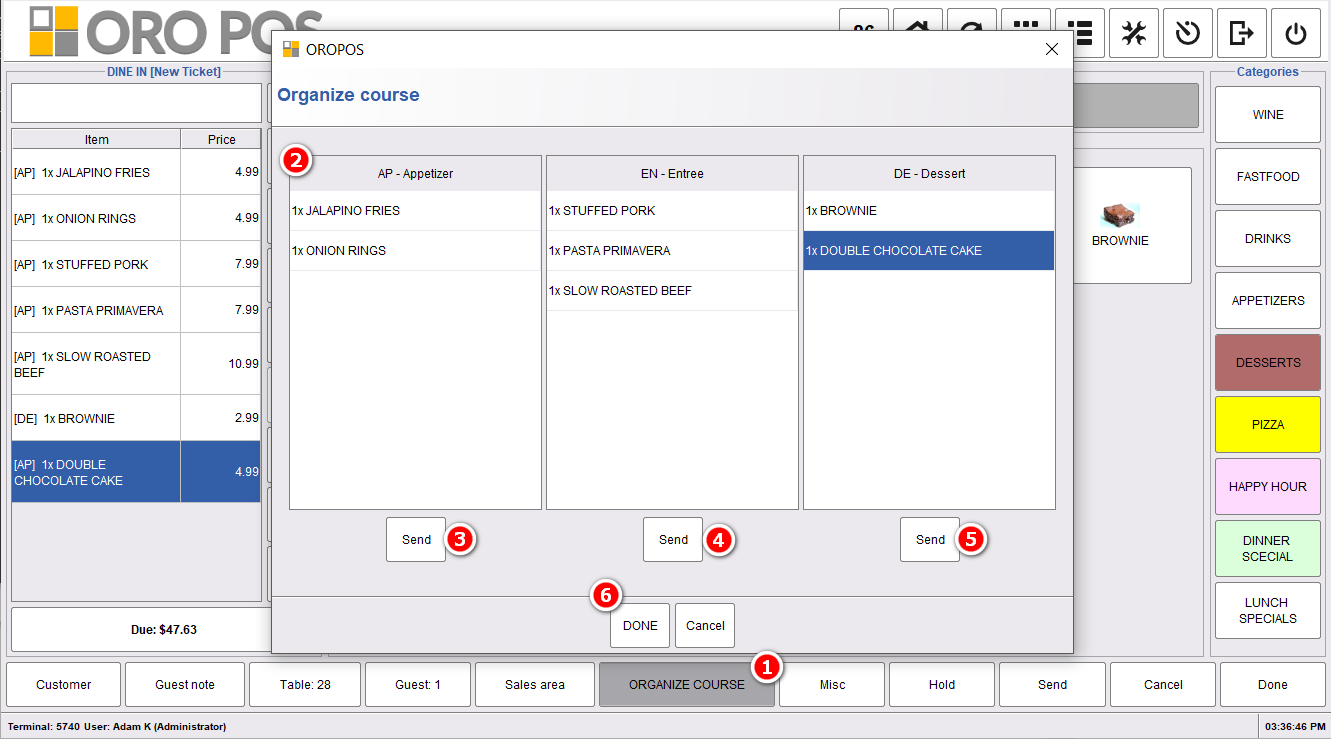
Forgot to assign a course to an item? In the order screen, click Organize Course → drag and drop items between courses on the fly.
5️⃣ Step 5: Send Courses Sequentially to Kitchen
This is the magic step. Instead of sending the entire ticket at once, server sends one course at a time.
The Flow
| Step | Action | Visual Indicator |
|---|---|---|
| 1 | Server presses Send for Appetizers | Appetizer items turn 🟡 deep yellow |
| 2 | Other courses stay in queue | Other items remain 🟨 light yellow |
| 3 | Customer eats appetizers | ⏳ Server waits |
| 4 | Server presses Send for Entrées | Entrée items turn 🟡 deep yellow |
| 5 | Customer eats entrée | ⏳ Server waits |
| 6 | Server presses Send for Dessert | Dessert items turn 🟡 deep yellow |
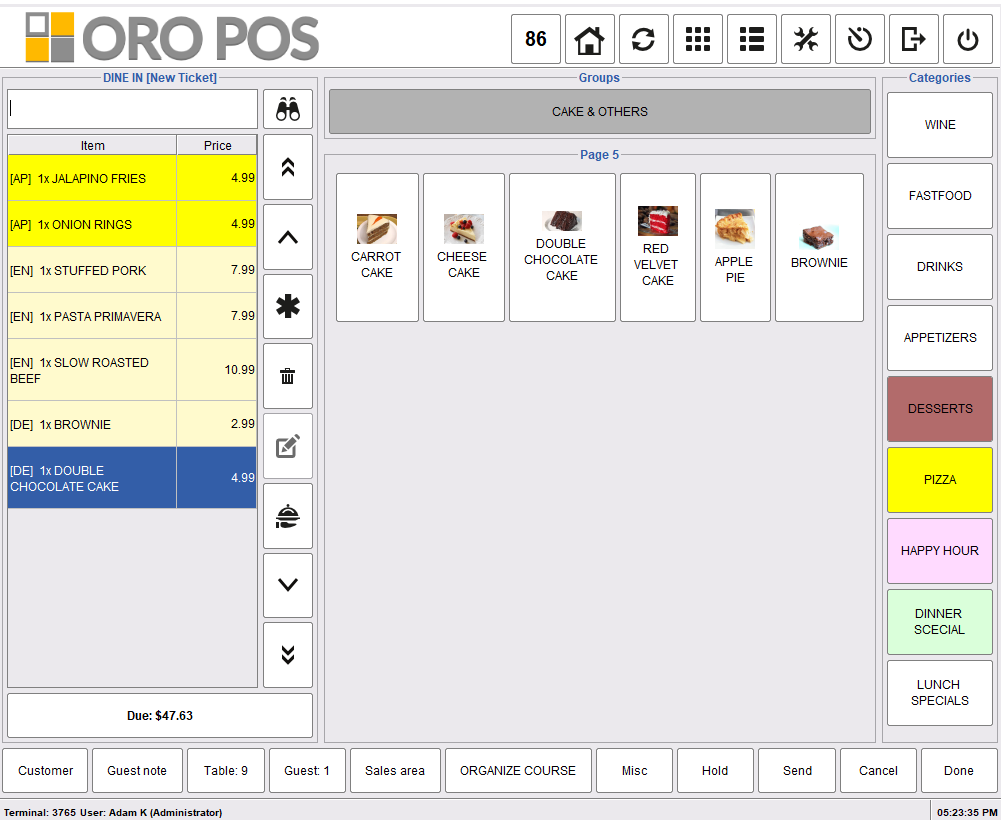
Sending the first course (Appetizers) to the kitchen
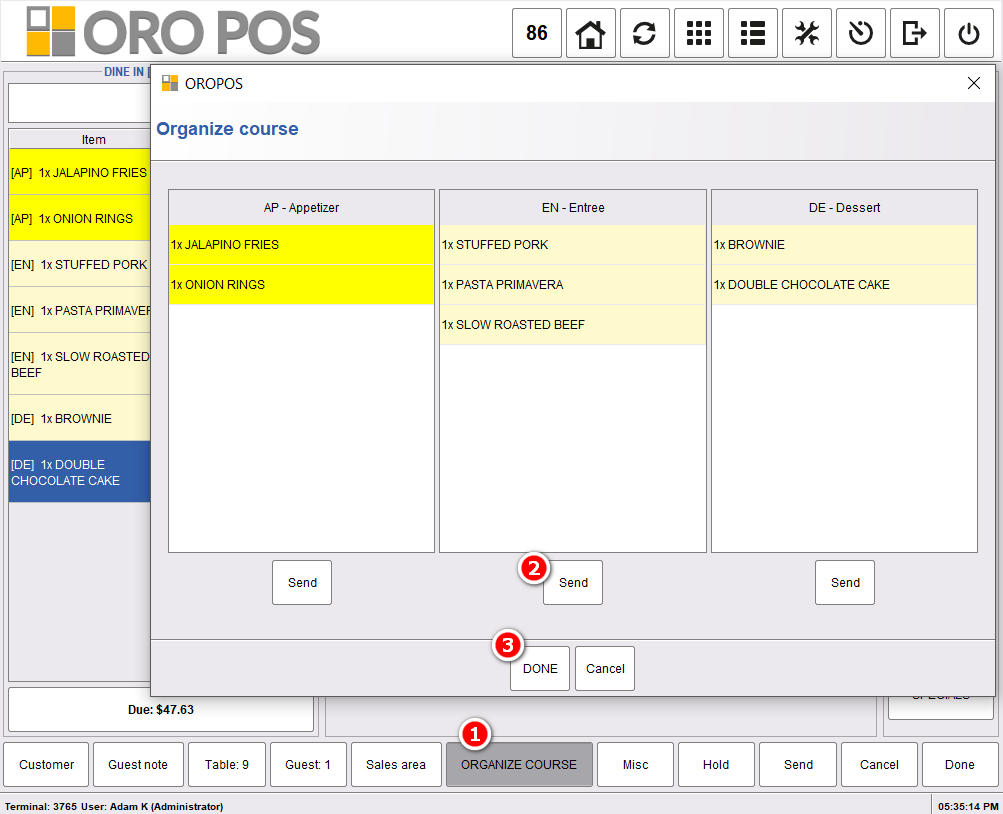
Sending the remaining courses to the kitchen
🎬 Full Walkthrough: A Romantic Dinner at “La Maison”
Couple celebrating anniversary. They order:
- 🥗 Caesar Salad + Tomato Bisque (appetizers)
- 🥩 Ribeye Steak + Pasta Carbonara (entrées)
- 🍰 Chocolate Mousse + Crème Brûlée (desserts)
- ☕ 2 Espressos (after-meal)
| Time | Action |
|---|---|
| 7:00 PM | Order taken — full ticket entered. Server sends Appetizers only |
| 7:08 PM | 🥗 Salad + 🍲 Soup arrive at table — couple enjoys |
| 7:25 PM | Server sees plates clear. Sends Entrées to kitchen |
| 7:38 PM | 🥩 Steak + 🍝 Pasta delivered hot, fresh, perfect |
| 8:05 PM | Couple finished. Server sends Desserts |
| 8:14 PM | 🍰 Mousse + 🍮 Crème Brûlée served |
| 8:25 PM | Server sends Drinks — 2 Espressos arrive |
| 8:35 PM | Bill paid. Customer leaves 5-star review: “Pacing was perfect!” |
The customer got a 1.5-hour dining experience instead of “everything dumped at once”. They ordered a $50 bottle of wine because they had time to enjoy. They left a 25% tip. They posted on Instagram.
⭐ Best Practices
| Tip | Why |
|---|---|
| Match courses to your cuisine style | 3 for casual, 5+ for fine dining |
| Always assign every menu item to a course | Unassigned items ride along with whichever course is sent first |
| Train servers to watch the table | Send next course when 80% of plates are clear |
| Use Drinks course for after-meal coffee | Most upselling happens at the end |
| Only enable on Dine-In | Take-out / Delivery don’t need pacing |
| Combine with Seat-Based Order | Track who ordered what + when each course goes |
📚 Related Guides
| → Seat-Based Order | → Order Type Setup | → Kitchen Printer |
📞 Need More Help?
Visit guide.orocube.com or contact helpdesk@orocube.net