

💼 Opening and Closing Cash Drawer
Once the cash drawer is connected (hardware-wise), the daily operation revolves around opening, using, and closing drawers. Whoever opens a drawer is responsible for the cash inside it — they typically close it at end of shift and hand cash to the supervisor.
The drawer is “yours” the moment you open it. Every cash sale adds to it. At end of shift, you count, the system compares “expected vs real”, and you hand the cash to the manager.
🎯 The Accountability Concept
The user who assigns themselves a drawer at the start of their shift becomes responsible for the cash inside until they close the drawer.
| Action | Who Does It | Accountability |
|---|---|---|
| 📂 Open drawer + count starting cash | Cashier (Sarah) | Sarah is now responsible |
| 💰 Take cash sales during shift | Sarah | Cash goes into Sarah’s drawer |
| 🔒 Close drawer + count cash | Sarah | System checks expected vs actual |
| 🤝 Hand over cash + sign report | Sarah → Supervisor (Mike) | Responsibility transfers to supervisor |
🔄 Visual: Drawer Lifecycle
📂
OPEN
Cashier assigns drawer,
enters opening balance
💰
SELL
Cash sales add to
drawer balance
🔒
CLOSE
Cashier counts cash,
enters actual amount
📊
REPORT
Expected vs Real,
spot any shortage
🤝
HANDOVER
Cashier hands cash
to supervisor
📂 Step 1: Opening a Drawer
When a cashier clocks in, they assign a drawer to themselves and enter the opening balance (the cash already in the till — usually the float for change).
| Step | Action |
|---|---|
| 1 | Cashier clocks in via Login screen |
| 2 | Tap “Assign Drawer” button |
| 3 | Count physical cash → enter as Initial Balance (e.g., $200 for change) |
| 4 | Confirm — drawer is now active and assigned to that cashier |
The opening balance is the baseline for the report. If you enter $0 when there’s actually $200 in change, the report will show a $200 over at close.
🛒 Step 2: During the Shift
Every cash transaction goes into the assigned drawer. Card sales don’t affect the drawer balance.
| Activity | Drawer Effect |
|---|---|
| 💵 Cash sale | Adds cash + change drops in |
| 💳 Card sale | No effect on drawer balance |
| ↩️ Cash refund | Cash leaves drawer |
| 💸 Cash payout (e.g., paying delivery driver) | Cash leaves drawer (logged with reason) |
| 📥 Cash drop / deposit to bank | Cash leaves drawer (logged) |
🔒 Step 3: Closing a Drawer
At the end of the shift, the cashier closes their drawer:
| Step | Action |
|---|---|
| 1 | Tap “Close Drawer” |
| 2 | System shows expected cash (opening + sales − refunds − drops) |
| 3 | Cashier counts physical cash and enters the actual amount |
| 4 | System calculates the difference (over/short) |
| 5 | Drawer report prints — cashier signs + hands cash to supervisor |
📊 Cash Drawer Report — Expected vs Real
The drawer report is the heart of the daily reconciliation. It shows what the system thinks should be in the drawer vs what’s actually there.
📌 Real Example: Sarah’s End-of-Shift Drawer Report
| Line | Amount |
|---|---|
| 📂 Opening Balance | $200.00 |
| + Cash Sales | $1,420.00 |
| – Cash Refunds | -$15.00 |
| – Cash Payouts (delivery tips) | -$50.00 |
| Expected Cash | $1,555.00 |
| Actual Cash Counted | $1,553.00 |
| Difference (Short) | -$2.00 |
Manager’s note: “$2 short — likely incorrect change given on a sale. Acceptable variance.”
📌 What the Difference Means
| Result | What It Means |
|---|---|
| $0 (perfect match) | Cashier did everything right ✓ |
| Negative (short) | Cash missing — incorrect change, theft, miscount |
| Positive (over) | Extra cash — under-charged customer, miscounted opening balance |
Most stores accept ±$5 per shift as normal human error. Anything above warrants a quick chat with the cashier.
👥 Multiple Drawers in One Day
A store can have multiple drawers active throughout the day — different shifts, different cashiers, different terminals. Each is tracked independently with its own report.
📌 Real Example: Coffee Shop with 3 Shifts
| Shift | Cashier | Open | Close | Sales | Variance |
|---|---|---|---|---|---|
| Morning | Sarah | 6:00 AM | 2:00 PM | $1,420 | -$2.00 |
| Afternoon | Mike | 2:00 PM | 7:00 PM | $890 | $0.00 |
| Evening | Linda | 7:00 PM | 10:00 PM | $520 | +$3.00 |
3 separate drawer reports, each cashier accountable for their shift. Owner reviews variances next morning.
🆕 Dual Cash Drawer (v1.6.5+)
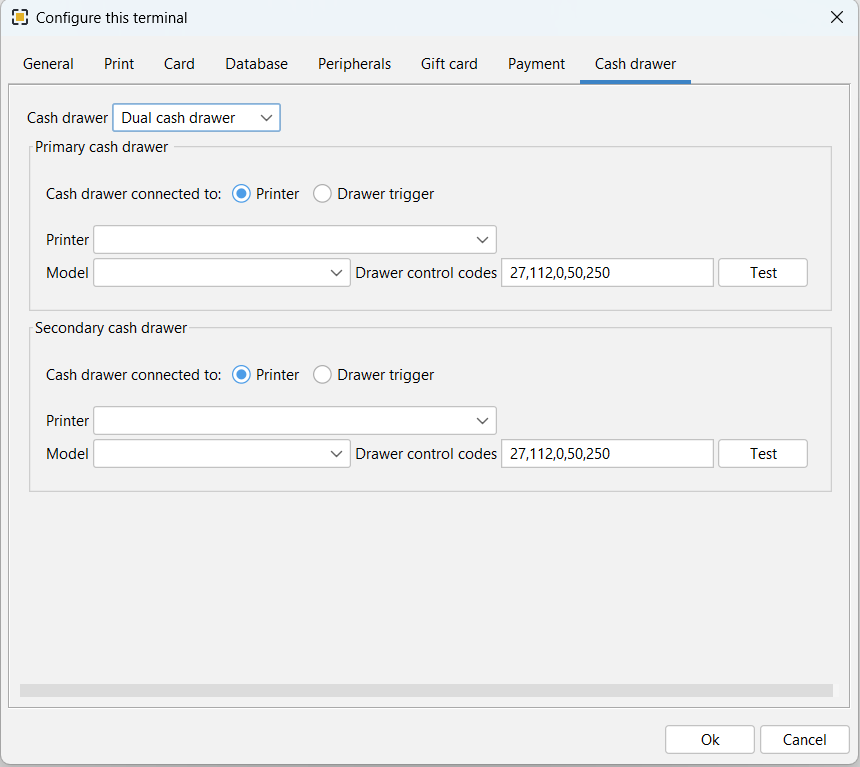
In ORO POS 1.6.5+, a single terminal can have TWO cash drawers physically connected — primary + secondary. They can swap when one fills up, or be assigned to two cashiers simultaneously.
💻
POS
💵
PRIMARY
Cashier A
💵
SECONDARY
Cashier B
How It Works
- 🔵 Primary drawer assigned to Cashier A
- 🟢 Secondary drawer assigned to Cashier B
- When Cashier A rings a sale → cash goes to Primary
- When Cashier B rings a sale → cash goes to Secondary
- Each closes their own drawer separately
🎯 Why Use Dual Cash Drawer?
| Reason | Real-World Use Case |
|---|---|
| 💰 Drawer fills up during peak | Friday-night bar gets so much cash, the primary drawer can’t fit more — manager swaps to secondary, takes primary to office to count |
| 👥 Two cashiers sharing one terminal | Small shop: Front counter + Drive-Thru on one POS; each cashier has their own drawer for accountability |
| 🔁 Mid-shift handoff without closing store | Cashier shift change at 2 PM — Sarah closes Primary, Mike opens Secondary on same terminal, no interruption |
| 🏦 Cash drop while operations continue | Manager removes Primary drawer to make a deposit at the bank during busy hours; Secondary keeps running |
| 🛡️ Security: Limit cash per drawer | Keep less cash in any single drawer — split sales across two for safer handling |
| 💱 Different currencies / payment types | Tourist areas: Primary for USD, Secondary for foreign currency or special tokens |
| 🍷 Separate till for special services | Primary for food sales, Secondary for liquor sales (separate accountability) |
📌 Real Scenario: Friday Night at “Joe’s Bar”
| Time | Event |
|---|---|
| 5:00 PM | Sarah opens Primary drawer with $300 float |
| 10:30 PM | Drawer holds $2,800 — physically can’t fit more bills |
| 10:31 PM | Manager opens Secondary drawer with $300 float |
| 10:32 PM | All new sales go to Secondary, Sarah takes Primary to office to count |
| 10:50 PM | Primary drawer report printed, cash deposited to safe — no service interruption |
| 2:00 AM | Bar closes, Secondary drawer closed normally |
💼 Real-World Scenarios
☕ Coffee Shop Single Drawer
One drawer, multiple cashiers throughout the day. Each shift change → close old drawer → open new with same cash count. Reports per shift.
🍴 Restaurant with Staff Banks (No Drawer Needed)
Servers don’t use a drawer at all. They use staff banks (personal cash bags). Set terminal to “No Cash Drawer” mode. Cash from sales goes to each server’s bank.
🍻 Bar with Dual Drawers
Friday-night rush requires a second drawer to swap when primary fills. Both drawers tracked separately for accountability.
🏪 Convenience Store Single Drawer with Many Cashiers
One drawer, but a different cashier each shift. Standard practice: closing cashier counts cash, signs report, hands to manager. Opening cashier counts again before starting their shift.
⭐ Best Practices
| Tip | Why |
|---|---|
| Always count cash before opening the drawer | Sets accurate baseline for the report |
| Close the drawer before handing it over | Variance is the closing cashier’s responsibility |
| Both cashier and supervisor sign the report | Records the cash handover formally |
| Investigate variances over $5 | Catches honest mistakes vs intentional theft early |
| Use cash drops when drawer gets too full | Limits maximum cash exposure per drawer |
| For dual drawer, pre-train staff on swap procedures | Smooth peak-time transitions |
| Keep variance log per cashier | Identify patterns over time |
📚 Related Guides
| → Cash Drawer Hardware Setup | → Store Sessions Guide | → Session Summary Report |
📞 Need More Help?
Visit guide.orocube.com or contact helpdesk@orocube.net