

📘 Ledger Entry in ORO POS Accounting
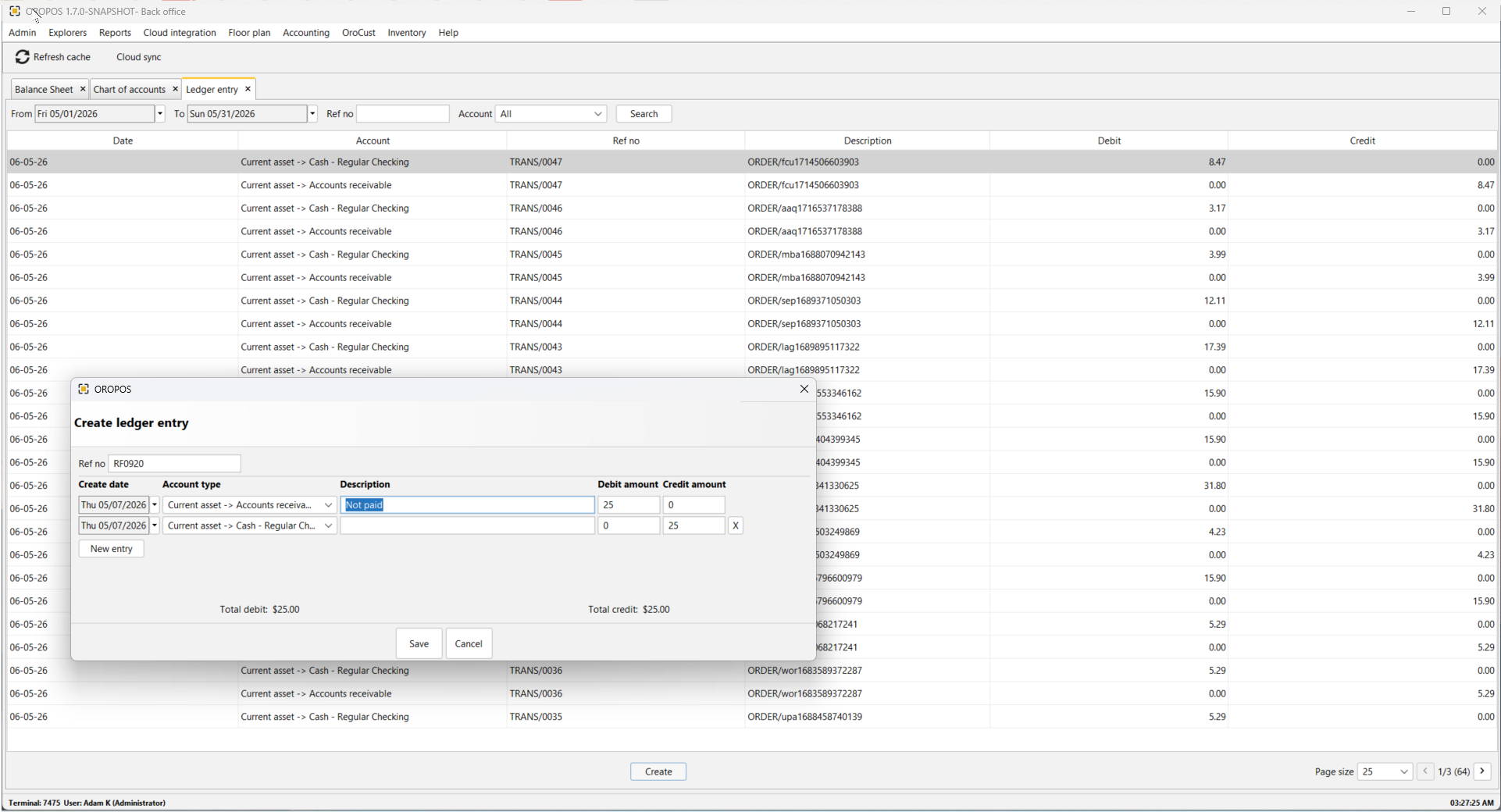
📸 Ledger Entry list with the Create Ledger Entry popup (click to enlarge)
A Ledger Entry is the accounting record created when money, sales, tax, payment, refund, inventory, or liability changes.
The Chart of Accounts defines the “buckets”. The Ledger Entry records the actual movement of money between those buckets.
🎯 What is a Ledger Entry?
A Ledger Entry records an accounting transaction with debits and credits — the foundation of double-entry bookkeeping.
📊 Example
A customer buys food for $10, pays $10.80 cash, including $0.80 sales tax.
| Account | Debit | Credit |
|---|---|---|
| Cash – Regular Checking / Cash Drawer | $10.80 | |
| Food Sales | $10.00 | |
| Sales Tax Payable | $0.80 |
That is a ledger entry — debits equal credits.
⚡ “Perpetual Accounting” in ORO POS
ORO POS records Sales, Payment, and Refund in a perpetual accounting way — the system does not wait until end of day, end of month, or manual export to know what happened.
When a cashier completes a sale, the following happen instantly:
- 📈 Sales account increases
- 💰 Cash/Card account increases
- 🧾 Tax payable increases
- 💵 Tips payable may increase
- 📦 Inventory may decrease
- 📊 Cost of goods sold may increase
The business owner can see accounting impact almost immediately.
📊 Periodic vs Perpetual Accounting
| Method | Meaning | Example |
|---|---|---|
| Periodic | Sales summarized later (end of day or month) | “Today total sales = $2,000” entered manually |
| Perpetual (ORO POS) | Every sale/payment/refund creates accounting movement immediately | Each POS ticket posts journal/ledger entries |
For a serious POS system, perpetual accounting is more powerful — reports stay live and accurate.
🔧 How ORO POS Ledger Entry Works
A POS transaction may create multiple ledger lines covering sales, payment, refund, and inventory effects.
1️⃣ Sale Entry
When a sale is created, the system records revenue, tax, tips, and inventory effect.
Example: Customer buys food for $50, tax $4, tip $6, total paid $60
| Account | Debit | Credit |
|---|---|---|
| Cash / Card Clearing | $60.00 | |
| Food Sales | $50.00 | |
| Sales Tax Payable | $4.00 | |
| Tips Payable | $6.00 |
The business earned $50, but collected $60. The extra $4 tax belongs to the government, and $6 tip belongs to employees.
2️⃣ Payment Entry
Payment can be recorded separately if the ticket was first created as unpaid, house account, customer credit, invoice, or tab.
Example: Customer owed $100, then pays by card
| Account | Debit | Credit |
|---|---|---|
| Credit Card Clearing | $100.00 | |
| Accounts Receivable | $100.00 |
The customer no longer owes money, and the card processor now owes the business settlement.
3️⃣ Refund Entry
Refund reverses the accounting effect of the original sale.
Example: Refund food sale of $20 with tax $1.60
| Account | Debit | Credit |
|---|---|---|
| Sales Return / Refund | $20.00 | |
| Sales Tax Payable | $1.60 | |
| Cash / Card Clearing | $21.60 |
This reduces income and reduces tax liability.
4️⃣ Inventory & COGS Posting
For restaurants and retail, perpetual accounting can also update inventory and cost.
Example: Customer buys retail item for $100. Item cost is $60.
Sales Side
| Account | Debit | Credit |
|---|---|---|
| Cash / Card Clearing | $100.00 | |
| Product Sales | $100.00 |
Cost Side
| Account | Debit | Credit |
|---|---|---|
| Cost of Goods Sold | $60.00 | |
| Inventory Asset | $60.00 |
- Revenue increased by $100
- Inventory decreased by $60
- Cost of goods sold increased by $60
- Gross profit is $40
🔢 Why Account Code Matters for Ledger Entry
In the screenshot, every account has an Account Code. Ledger entries store both the account code and account name/ID.
| Account Code | Account Name | Type |
|---|---|---|
| 10100 | Cash – Regular Checking | Current Asset |
| 10200 | Bank – Regular Checking | Current Asset |
| 831 | Sales Tax | Current Liability |
| 835 | Tips | Current Liability |
| 500 | Cost of Goods Sold | Direct Costs |
Why It’s Needed
| Reason | Explanation |
|---|---|
| Accurate posting | POS knows exactly where to post sales, tax, tips, refund, inventory |
| Easy reporting | Balance Sheet and P&L can group accounts properly |
| Avoid confusion | “Cash Register” and “Cash Bank” sound similar — codes separate them |
| Accounting export | QuickBooks, Xero, etc. require account codes |
| Audit trail | Every transaction can be traced back to a coded account |
🍴 Common Restaurant Ledger Entries
1. Dine-In Sale Paid by Cash
| Account | Debit | Credit |
|---|---|---|
| Cash Drawer | Total received | |
| Dine-In Food Sales | Food amount | |
| Beverage Sales | Beverage amount | |
| Sales Tax Payable | Tax | |
| Tips Payable | Tip |
2. Credit Card Sale (with later settlement)
At the time of sale:
| Account | Debit | Credit |
|---|---|---|
| Credit Card Clearing | Total card amount | |
| Sales Income | Sale amount | |
| Sales Tax Payable | Tax | |
| Tips Payable | Tip |
When card processor deposits money:
| Account | Debit | Credit |
|---|---|---|
| Bank Account | Net deposit | |
| Merchant Fee Expense | Processing fee | |
| Credit Card Clearing | Gross card amount |
3. Gift Card Sale
When sold (NOT income yet — it’s a liability):
| Account | Debit | Credit |
|---|---|---|
| Cash / Card Clearing | $50.00 | |
| Gift Card Liability | $50.00 |
When redeemed:
| Account | Debit | Credit |
|---|---|---|
| Gift Card Liability | $50.00 | |
| Food Sales | Sale amount | |
| Sales Tax Payable | Tax amount |
4. Tips Collected & Paid Out
When tip is collected:
| Account | Debit | Credit |
|---|---|---|
| Cash / Card Clearing | Tip amount | |
| Tips Payable | Tip amount |
When tips are paid to employees:
| Account | Debit | Credit |
|---|---|---|
| Tips Payable | Tip payout | |
| Cash / Bank | Tip payout |
🛒 Retail Business Ledger Examples
1. Product Sale
| Account | Debit | Credit |
|---|---|---|
| Cash / Card Clearing | Sale total | |
| Product Sales | Sale before tax | |
| Sales Tax Payable | Tax |
2. Inventory Cost Posting
| Account | Debit | Credit |
|---|---|---|
| Cost of Goods Sold | Product cost | |
| Merchandise Inventory | Product cost |
3. Product Refund (with return to inventory)
Sales reversal:
| Account | Debit | Credit |
|---|---|---|
| Sales Return / Refund | Sale amount | |
| Sales Tax Payable | Tax amount | |
| Cash / Card Clearing | Refund total |
Inventory reversal:
| Account | Debit | Credit |
|---|---|---|
| Merchandise Inventory | Product cost | |
| Cost of Goods Sold | Product cost |
📝 Ledger Entry Screen Fields
A proper Ledger Entry screen contains these fields:
| Field | Meaning |
|---|---|
| Date / Time | When the transaction happened |
| Transaction No / Ticket No | POS ticket reference |
| Entry Type | Sale, payment, refund, payout, adjustment, purchase |
| Account Code | Accounting code |
| Account Name | Account affected |
| Debit | Amount added to debit side |
| Credit | Amount added to credit side |
| Description | Explanation of the entry |
| User / Terminal | Which cashier/terminal created it |
| Reference | Order ID, payment ID, refund ID, invoice ID |
| Status | Posted, voided, reversed, pending |
In any ledger entry, Total Debits MUST equal Total Credits. The Create Ledger Entry popup shows this at the bottom (e.g., “Total debit: $25.00 / Total credit: $25.00”) to enforce balanced entries.
🎯 Why This is Powerful for ORO POS
| Feature | Benefit |
|---|---|
| Live sales posting | Owner can see revenue quickly |
| Tax liability tracking | Sales tax separated from real income |
| Tip liability tracking | Tips not confused with business revenue |
| Refund reversal | Clean audit trail |
| Inventory-to-COGS posting | Accurate gross profit |
| Payment clearing | Card settlement can be reconciled later |
| Multi-terminal audit | Each transaction can be traced |
| Balance Sheet support | Assets, liabilities, equity stay connected |
| Profit & Loss support | Sales, cost, expenses reported correctly |
📚 Related Guides
📞 Need More Help?
Visit our knowledge base at guide.orocube.com or contact support at helpdesk@orocube.net