

🎨 Variants in ORO POS
Variants let one menu item have many “versions” — different sizes, colors, genders, flavors, etc. — each tracked separately for stock, price, and barcode. Essential for retail stores that sell apparel and footwear.
Instead of creating “T-Shirt Small Black”, “T-Shirt Medium Black”, “T-Shirt Small White” as separate items, you create one “T-Shirt” item — and let it have variants by Size and Color.
🧩 What is a Variant?
A Variant is a specific combination of Attributes (Size, Color, Material, etc.) of one base item.
| Concept | Example |
|---|---|
| 📦 Base Item | T-Shirt |
| 🏷️ Attribute Group | Size, Color |
| 🎨 Attributes | Small / Medium / Large; Black / White / Red |
| ✨ Variant | “T-Shirt — Medium Black” with own SKU + price + stock |
👗 Classic Retail Examples
Variants are essential for retail. Without them, an apparel store would need hundreds of separate items.
👟 Shoe Store Example
“Nike Running Shoe” base item with 3 attributes:
| Attribute | Options |
|---|---|
| 📏 Size | 7, 8, 9, 10, 11, 12 |
| 🎨 Color | Black, White, Red, Blue |
| 🚹🚺 Gender | Men’s, Women’s |
→ This generates 6 sizes × 4 colors × 2 genders = 48 variants. Each tracked separately.
Without variants: 48 separate items in your menu — chaos!
With variants: 1 item “Nike Running Shoe” with 48 variants under it.
👕 T-Shirt Store Example
| Variant | SKU | Price | Stock |
|---|---|---|---|
| T-Shirt S, Black | TS-S-BLK | $19.99 | 15 |
| T-Shirt M, Black | TS-M-BLK | $19.99 | 22 |
| T-Shirt L, White | TS-L-WHT | $21.99 (+$2) | 8 |
| T-Shirt XL, Red | TS-XL-RED | $22.99 (+$3) | 5 |
🎒 Other Retail Examples
| Product | Common Attributes |
|---|---|
| 👖 Jeans | Size, Length, Color, Fit (Slim/Regular) |
| 📱 Phone Case | Phone Model, Color, Material |
| 🎒 Backpacks | Size, Color, Pattern |
| ⌚ Watch | Strap Color, Case Size, Movement Type |
| 🧴 Cosmetics | Shade, Size, Skin Type |
🍔 Restaurant Examples (When Variants Make Sense)
Variants are mostly a retail feature, but restaurants can also use them in some cases:
| Restaurant Item | Variant Attributes |
|---|---|
| 🥤 Bottled Soda | Size: 12oz / 20oz / 1L; Flavor: Coke / Sprite / Diet |
| 🍷 Wine Bottles | Vintage Year, Region, Bottle Size |
| 🍺 Craft Beer (retail) | Size: 6-pack / 12-pack / Single; Style |
| 🧣 Branded Merchandise | Size, Color (e.g., the restaurant’s own t-shirts) |
| 📦 Packaged Goods | Bottle/jar size, flavor (sauces, dressings sold) |
For most prepared food (burgers, pizzas, sandwiches), do NOT use variants. Use modifiers instead. See “Variants vs Modifiers” below.
🆚 Variants vs Modifiers — When to Use What?
| Use Case | Use Variants | Use Modifiers |
|---|---|---|
| 🌭 Burger toppings (lettuce/no lettuce) | ❌ | ✅ |
| ☕ Latte size (Sm / Md / Lg) | ⚙️ Either | ⚙️ Either |
| 🍕 Pizza crust + toppings | ❌ | ✅ |
| 👕 T-Shirt size + color | ✅ | ❌ |
| 👟 Shoe size + color | ✅ | ❌ |
| 🥪 Sandwich bread choice | ❌ | ✅ |
| 🍷 Wine bottle vintage | ✅ | ❌ |
📌 Rule of Thumb
- 👕 Variants = Same item in different physical forms (size, color, material, gender). Each has its own SKU and stock.
- 🌶️ Modifiers = Customizations or condiments added during preparation. Don’t have separate stock.
✅ Advantages of Using Variants
| Benefit | Why It Matters |
|---|---|
| 📋 Clean menu | 1 item “Nike Shoe” instead of 48 variations cluttering the menu |
| 📊 Per-variant inventory | Track stock for each size/color separately |
| 💵 Per-variant pricing | XL costs $3 more than M; price extras handled automatically |
| 🏷️ Auto-generated barcodes | Each variant gets its own unique barcode for scanning |
| 📈 Sales reports per variant | “Black sells more than White; reorder more Black” |
| 🛒 Easier customer search | Cashier picks one shirt → chooses size/color |
⚠️ When NOT to Use Variants — A Common Pitfall
Variants are essential for retail — but if you over-use them, sales/inventory reports become hard to read. Each variant counts separately, and trends get lost in the noise.
📌 Bad Example: Over-using Variants
A burger restaurant tries to use variants for “Burger” with attributes:
- Patty: 1, 2, 3
- Cheese: Yes / No
- Lettuce: Yes / No
- Tomato: Yes / No
- Onion: Yes / No
Result: 3 × 2 × 2 × 2 × 2 = 48 variants per burger. Sales report shows 48 different burger SKUs. Inventory becomes impossible to track. Just use modifiers!
✅ Better Approach for Most Cases
For regular cases, keep items separate and manage them under groups — much easier inventory and clearer reports.
- Want sizes? → Use modifiers with price extras
- Want condiments? → Use modifier groups
- Want pizza customization? → Use pizza-style modifiers
- Want 2 different products that share a recipe? → Keep them as separate items
1️⃣ Step 1: Create Attributes
Path: Back-Office → Explorers → Attributes → Create New Attribute Group
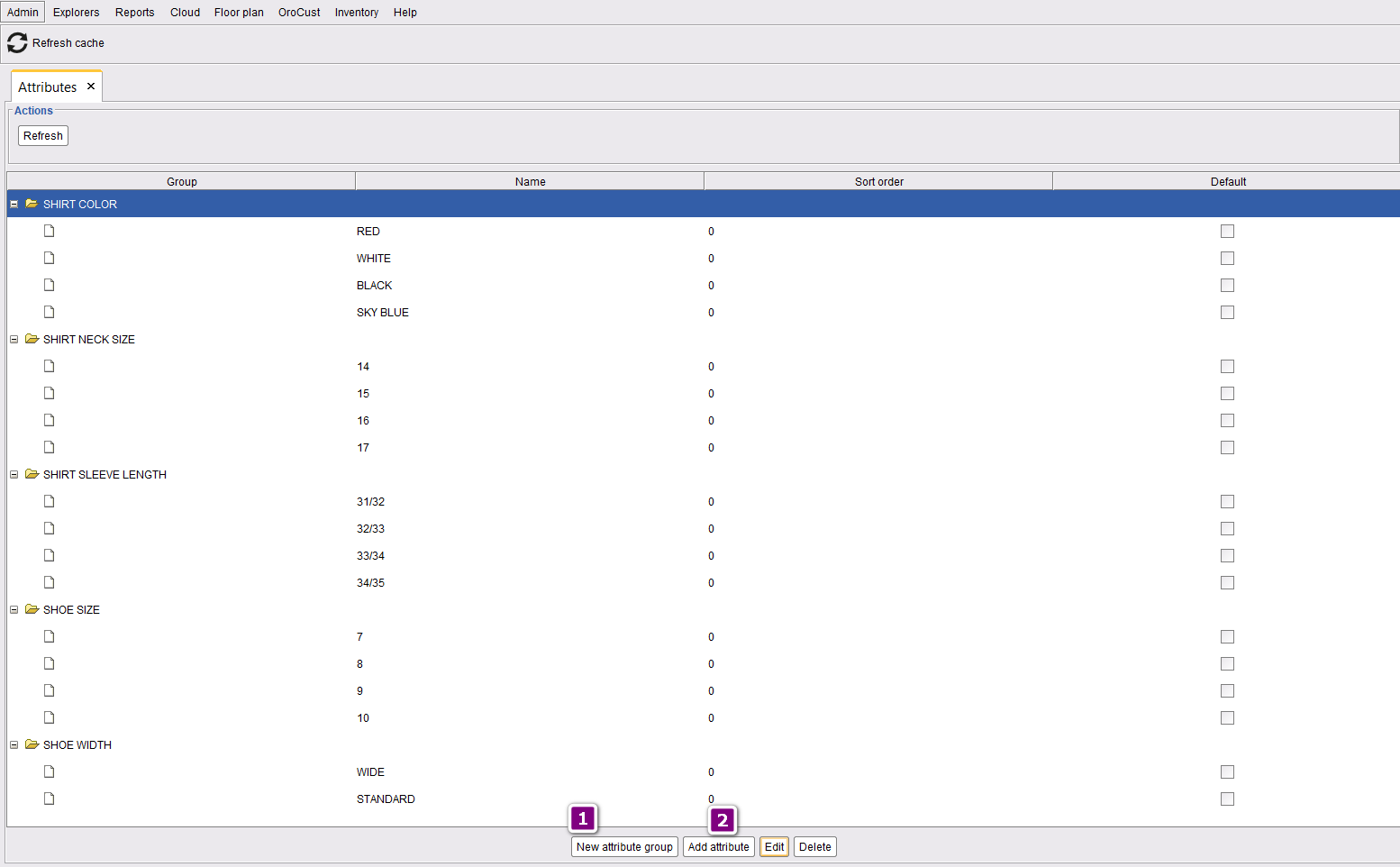
| Step | Action |
|---|---|
| 1 | Create Attribute Group (e.g., “Size”, “Color”, “Gender”) |
| 2 | Under each group, add attributes (e.g., Small, Medium, Large) |
2️⃣ Step 2: Add Variants to a Menu Item
Path: Back-Office → Explorers → Menus & Others → (Select item) → Edit → Mark “Has Variant”
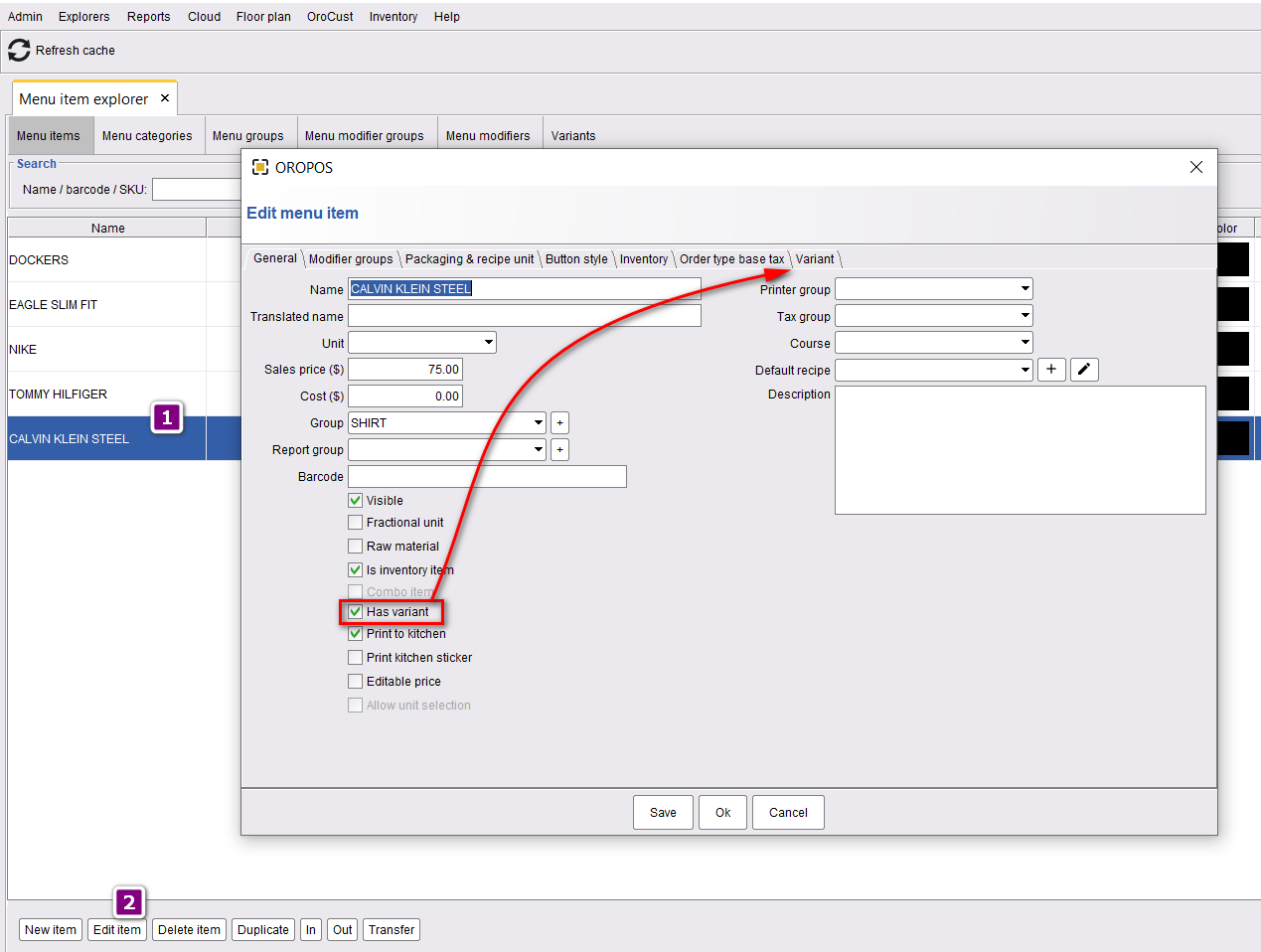
Then go to the variant window:
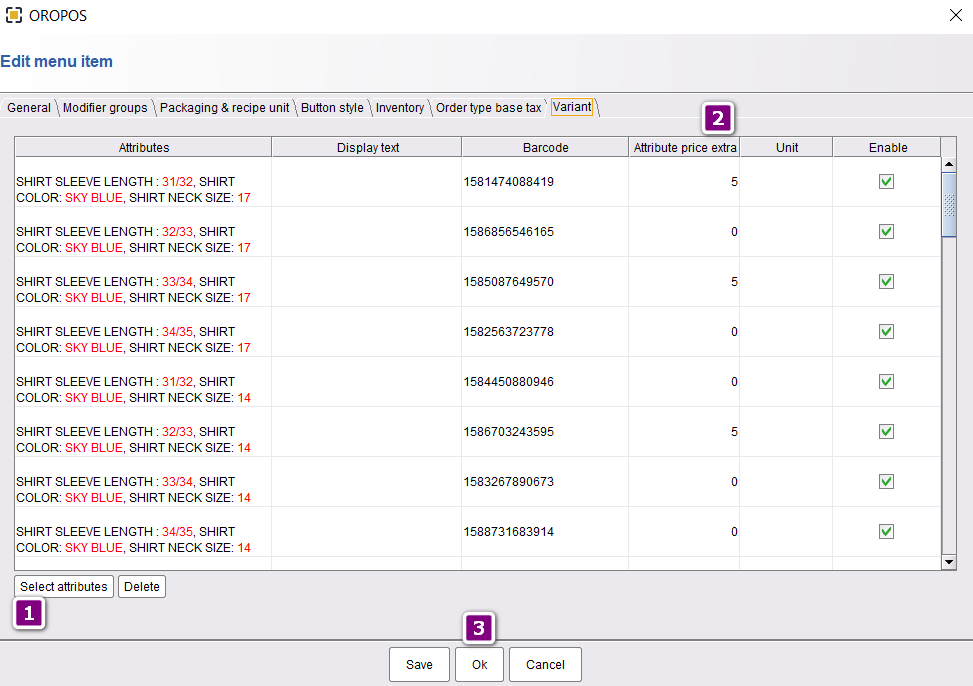
| Step | Action |
|---|---|
| 1 | Click Select Attributes → choose attributes to combine |
| 2 | Set price extra for each variant (optional) |
| 3 | Click OK to save |
| 4 | Barcodes auto-generate for each variant |
💵 How Variant Pricing Works
📌 Example
Base item “T-Shirt” priced at $75.
| Attribute | Price Extra | Final Variant Price |
|---|---|---|
| Small Black | $0 | $75 |
| Medium Black | $0 | $75 |
| Large White | $5 | $80 |
| XL Red | $7 | $82 |
🍔 Better Alternatives — Modifiers, Combos, Pizza
For restaurants and food service, these features are usually a better fit than variants:
| Feature | Best For | Guide |
|---|---|---|
| 🌶️ Modifiers | Toppings, condiments, sauces, sizes | Adding Modifier for an Item |
| 💰 Modifier Price Rules | Different prices when modifier is on different items | Modifier Price Rules |
| 🔄 Apply Modifier Group | Reuse same modifiers across multiple items | Applying Modifier Groups |
| 🍕 Pizza Items | Half-and-half pizzas, multiple toppings, crust types | Adding Pizza in ORO POS |
| 🍔 Combo Items | Bundle deals (Burger + Fries + Drink) | Combo Items |
⭐ Best Practices
| Tip | Why |
|---|---|
| Use variants for retail products with size/color | Each combo needs its own SKU and stock count |
| For prepared food, use modifiers | Avoids cluttering inventory with thousands of SKUs |
| Limit variants to 2-3 attributes max | More attributes = exponentially more variants |
| Use price extras for size upgrades | L = +$2, XL = +$3 — clean pricing |
| Print variant barcode labels | Cashier scans → exact variant identified |
| Don’t use variants for condiments | Use modifier groups — reports stay clean |
📚 Related Guides
| → Adding Modifiers | → Modifier Price Rules |
| → Adding Pizza | → Combo Items |
📞 Need More Help?
Visit guide.orocube.com or contact helpdesk@orocube.net