


⚙️ Inventory Configuration
Inventory Configuration controls how ORO POS tracks stock — when balances update, how cost is calculated, and where each terminal pulls inventory from. Set this up once at the start.
Go to Back-Office → Inventory → Configuration
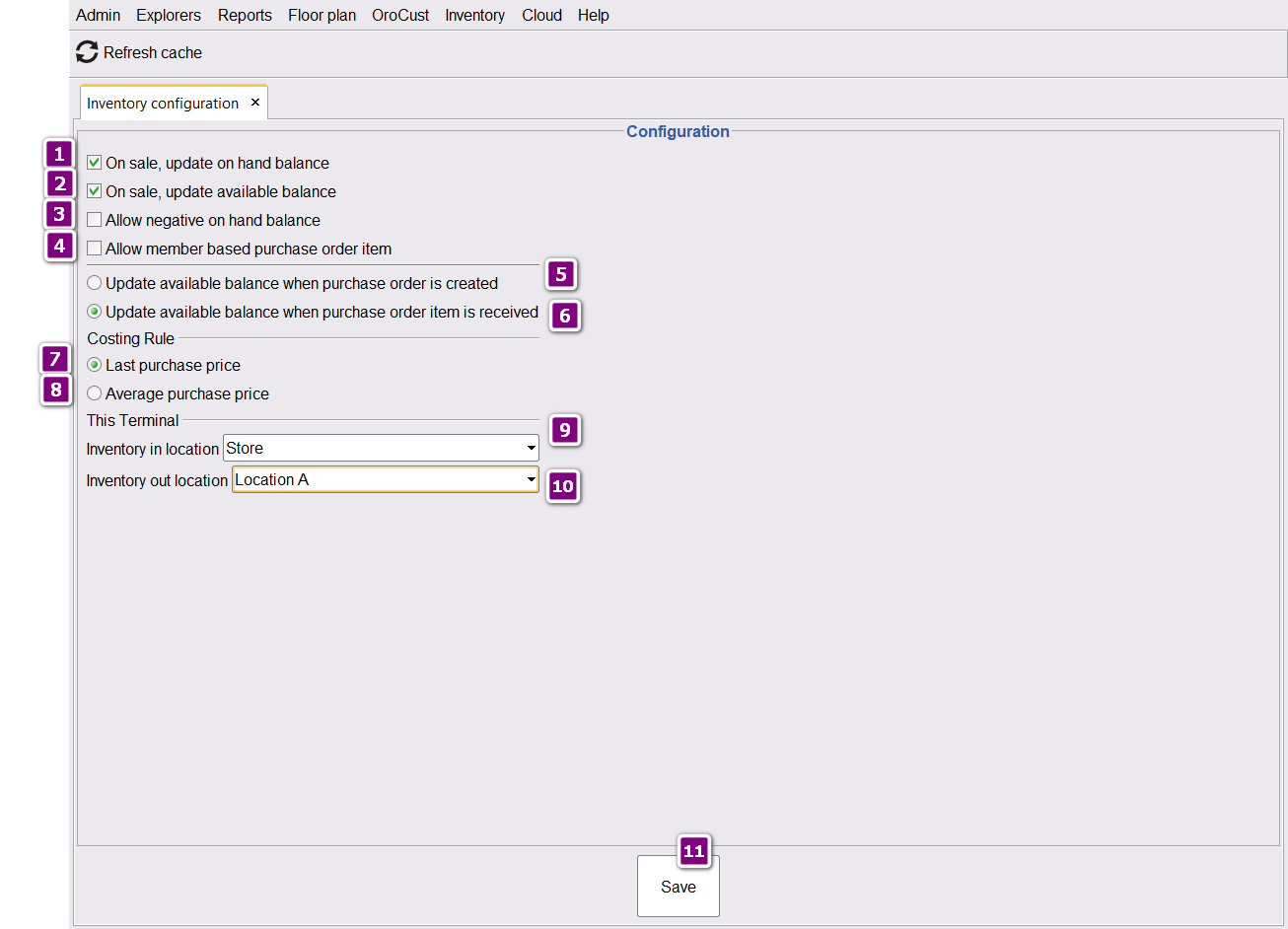
1️⃣ General Settings (Stock Update Behavior)
| Setting | What It Does |
|---|---|
| Update on-hand balance on sale | When you sell an inventory item, stock drops in real time. |
| Update available balance on sale | “Available” balance also drops (used for low-stock alerts and reorder logic). |
| Allow negative on-hand balance | Cashier can sell items even when stock = 0 (balance goes below zero). |
📌 Real Example: Soda
Starting stock: 50 cans of Coke
Customer buys: 3 cans
- ✅ Update on-hand on sale ON → Stock immediately becomes 47 cans
- ❌ Update on-hand on sale OFF → Still shows 50 (you’d update manually later)
Allow if: You have a fast-paced store and don’t always have time to count stock — better to sell now and reconcile later.
Disallow if: You want strict stock accuracy or your items are pre-paid (gift cards, etc.).
2️⃣ Purchase Order (PO) Settings
This decides when the system increases your stock after a Purchase Order:
| Option | When Stock Updates | Best For |
|---|---|---|
| 📝 When PO is created | As soon as you submit the order to vendor | Stores with reliable, fast deliveries |
| 📦 When items received | When goods physically arrive at your store | Most stores (recommended) |
📌 Real Example
Monday: You create a PO for 100 Coke cases from your supplier
Friday: Truck arrives and delivers them
- 📝 Update on PO Created → Stock reflects 100 cases Monday (even though they’re not in store yet)
- 📦 Update on Items Received → Stock reflects 100 cases Friday (when actually delivered) ✓ Recommended
3️⃣ Costing Rules (How Item Cost is Calculated)
When prices fluctuate, ORO POS needs a rule to figure out the “cost” of items in your reports.
| Costing Rule | How It Works |
|---|---|
| 💰 Last Purchase Price | Cost = Most recent purchase price you paid |
| 📊 Average Purchase Price | Cost = Average across all purchases (weighted) |
📌 Real Example: Buying Coffee Beans
| Date | Quantity | Price/lb | Total |
|---|---|---|---|
| Jan 1 | 100 lb | $5.00 | $500 |
| Feb 1 | 100 lb | $6.00 | $600 |
| Mar 1 | 100 lb | $7.00 | $700 |
If you sell 1 lb of coffee on March 5:
| Costing Rule | Calculated Cost |
|---|---|
| 💰 Last Purchase | $7.00 (most recent buy) |
| 📊 Average Purchase | $6.00 ((500+600+700) ÷ 300) |
Once costing rules are applied and you’ve started reporting, do not switch. Changing later will cause incorrect inventory reports and confused accountants.
- Average Purchase → Smoother profit reports, recommended for most stores
- Last Purchase → Best when prices are stable or you want simplest accounting
4️⃣ Location Settings by Terminal
Each terminal can have a different “default” inventory location for receiving and selling.
| Setting | Purpose |
|---|---|
| 📥 Inventory IN Location | Where you receive stock (warehouse, back room, etc.) |
| 📤 Inventory OUT Location | Where stock is deducted from when sold |
📌 Real Example: Multi-Location Restaurant
You run a restaurant with 3 stations:
- 🏠 Main Kitchen — receives all bulk deliveries
- 🍺 Bar Terminal — sells from bar fridge
- 🚗 Drive-Thru — sells from front prep area
Configuration:
- All terminals → IN Location: Main Kitchen
- Bar Terminal → OUT Location: Bar Fridge
- Drive-Thru → OUT Location: Front Prep
When a beer sells at the bar, stock drops at Bar Fridge. When fries sell at drive-thru, stock drops at Front Prep. Reports show exactly where each item went!
🎬 Real-World Walkthrough
How all four settings work together for a typical retail store:
| Day | Action | Setting in Use |
|---|---|---|
| Mon | Create PO for 50 cases of Coke | 📝 PO Setting (created) |
| Wed | Truck arrives, you receive 50 cases at Main Storage | 📦 PO Receive + 📥 IN Location |
| Wed | Stock = +1200 cans @ $0.50/can each | 💰 Costing Rule logs cost |
| Wed | Cashier sells 5 Cokes at front counter | 📤 OUT Location + Update on sale |
| Wed | Stock drops to 1195 cans automatically | ✅ All settings working together |
⭐ Recommended Setup
For most restaurants and retail stores:
| Setting | Recommended Value |
|---|---|
| Update on-hand on sale | ✅ Yes |
| Update available on sale | ✅ Yes |
| Allow negative balance | ⚙️ Optional (depends on workflow) |
| PO update timing | 📦 When items received |
| Costing rule | 📊 Average Purchase Price |
| IN Location | Main Storage / Warehouse |
| OUT Location | Per-terminal (where each terminal sells from) |
📚 Related Guides
| → Location Setup | → Purchase Orders | → Stock Count |
📞 Need More Help?
Visit our knowledge base at guide.orocube.com or contact support at helpdesk@orocube.net