

🖥️ Single Terminal vs Client-Server: Choosing Your ORO POS Setup
When setting up ORO POS, you have two deployment options. Choose the one that fits your business needs.
This setup mirrors how Floreant POS works — single terminal for standalone use, or one server with multiple connected client terminals. If you’ve configured Floreant before, the architecture, network setup, and database concepts will feel almost identical in ORO POS.
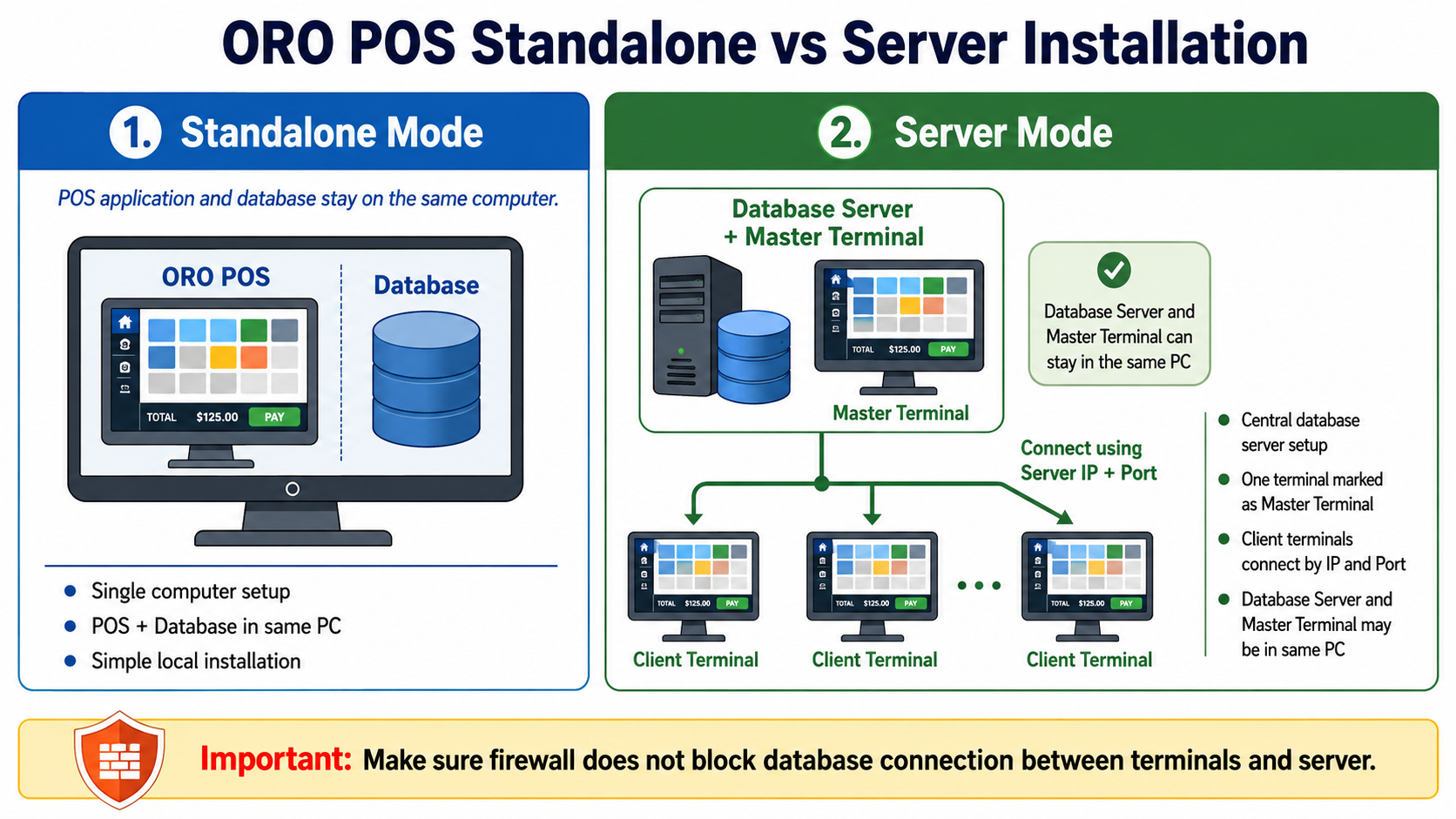
📊 ORO POS deployment modes: Standalone vs Server
1️⃣ Standalone Mode (Single Terminal)
Best for: Demos, small businesses, single-register stores, food trucks, or simple setups.
The POS application and database run on the same computer. Everything is self-contained — easy to install, easy to maintain.
Standalone Mode Features:
- ✓ Single computer setup — install once, start using
- ✓ POS + Database in same PC — no network configuration needed
- ✓ Simple local installation — perfect for demos and trials
- ✓ Lower cost — only one machine required
2️⃣ Server Mode (Client-Server / Multi-Terminal)
Best for: Restaurants with multiple registers, busy retail stores, businesses needing real-time data sharing across stations.
One central Database Server stores all data. Multiple Client Terminals connect to it over the network using IP + Port. All terminals share the same data in real-time.
Server Mode Features:
- ✓ Central database server — all data in one place
- ✓ One terminal marked as Master Terminal — manages settings & menu
- ✓ Client terminals connect by IP and Port — easy to add more registers
- ✓ Database Server and Master Terminal can stay in the same PC — saves hardware cost
- ✓ Real-time data sync — orders, inventory, payments shared instantly
Make sure your firewall does not block database connections between terminals and the server. Open the database port on the server machine.
📜 Database Engine: Why PostgreSQL Now?
Before version 1.6.8: Apache Derby was the most common database engine for ORO POS. It worked well for small setups.
Version 1.6.8 and later: ORO POS installer now installs PostgreSQL by default — a much more stable, enterprise-grade database that can handle a huge number of terminals.
Why PostgreSQL is better:
- ✓ More stable — battle-tested in enterprise deployments worldwide
- ✓ Scales massively — supports a huge number of concurrent terminals
- ✓ Better performance — faster queries, better concurrency
- ✓ Industry standard — widely supported and trusted
- ✓ Reliable backups — robust backup and recovery options
🤔 Which Mode Should You Choose?
| Scenario | Recommended Mode |
|---|---|
| Trying out ORO POS / Demo | Standalone |
| Single register store / Food truck | Standalone |
| Small café (1-2 stations) | Standalone or Server |
| Restaurant with multiple POS stations | Server Mode |
| Large retail store / Multi-station bar | Server Mode |
| Need shared inventory across registers | Server Mode |
🚀 Ready to Set Up Multiple Terminals?
ORO POS includes a built-in Setup Wizard that walks you through configuring multiple terminals. The process is straightforward and doesn’t require deep technical knowledge.
What’s covered in the multi-terminal guide:
- 📌 How to designate a Master Terminal
- 📌 Setting up the database server
- 📌 Connecting client terminals via IP and Port
- 📌 Network and firewall configuration
- 📌 Troubleshooting connection issues
You can start with Standalone mode for testing and convert to Server mode later when your business grows. Your menu, settings, and data can be migrated.
📚 Need More Help?
Visit our knowledge base at guide.orocube.com or contact support at helpdesk@orocube.net