


📋 Inventory Stock Count
A Stock Count is when you physically count your inventory and reconcile it against what the POS thinks you have. Essential for any store with real inventory — especially retail and groceries — because the system’s “on-hand” number rarely stays accurate forever.
You walk through your shelves with a tablet, count what’s actually there, type the real numbers into ORO POS — and the system corrects itself. That’s a stock count.
🎯 Why Stock Counts Matter
| What You Discover | What It Tells You |
|---|---|
| 📉 System says 100, shelf has 92 | Possible theft, damage, or unrecorded waste |
| 📈 System says 50, shelf has 60 | Receiving error, double-entered stock, or returned items |
| 🟰 Numbers match perfectly | Your inventory process is solid 👏 |
| 📊 Patterns over months | Identify shrinkage trends, problem categories |
⚠️ Why Stock Isn’t Always Real-Time
Even with the best inventory system, real-world stock drifts away from system stock over time. Stock counts catch and fix that drift.
Common Reasons for Drift
| Cause | Example |
|---|---|
| 📦 Items not scanned at sale | Cashier rang as “Misc” instead of scanning the barcode |
| 🧾 Receiving errors | Vendor sent 48 cans, manager counted 50 |
| 🥶 Spoilage not recorded | 3 lb of meat went bad, no Stock-Out entered |
| 💔 Breakage / damage | Bottle dropped — no time to record it |
| 🚪 Shrinkage / theft | Items walked out the door |
| 🍴 Recipe mismatch | Chef uses 2 oz cheese, recipe says 1.5 oz |
| 🔄 Internal use unrecorded | Staff meals, owner’s family eats from stock |
📅 How Often Should You Count?
| Business Type | Recommended Frequency |
|---|---|
| 🏪 Convenience store / Grocery | Weekly (high-volume) or monthly (low-volume) |
| 🛍️ Retail store | Monthly + spot checks for high-shrinkage items |
| 🍴 Restaurant | Weekly (perishables), monthly (dry goods) |
| 🍷 Bar / Liquor store | Weekly (high theft risk) |
| 📦 Warehouse / Wholesale | Quarterly + annual full count |
Don’t try to count everything at once. Use cycle counting — count 1/4 of your inventory each week. By the end of the month, everything’s been counted with much less effort.
📱 Recommended Hardware: Tablet + Barcode Scanner
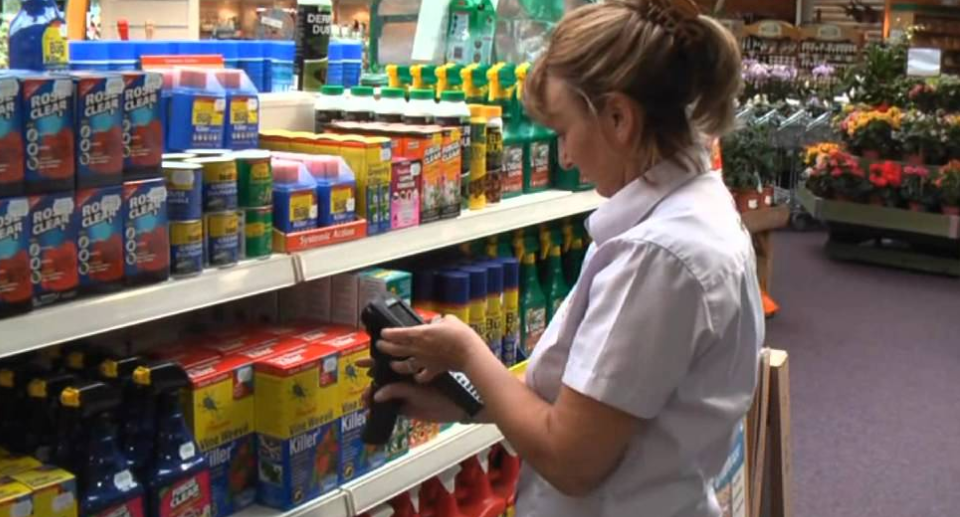
Use ORO POS on a Windows-based tablet with a USB or Bluetooth barcode scanner. Walk around the store, scan each item, type the count. Way faster than paper sheets.
📌 Why This Works So Well
| Approach | Speed | Errors |
|---|---|---|
| 📝 Pen + paper, then enter into POS | Slow (2× work) | High (transcription) |
| 📱 Tablet + Scanner | Fast (1× direct entry) | Low (scan = exact item) |
| 💻 Wired POS terminal walking around | Impossible (cable!) | N/A |
🛒 Hardware Shopping List
- 📲 Windows 10/11 tablet (10-12″ screen recommended)
- 🔫 Bluetooth or USB barcode scanner (Honeywell, Symbol, or similar)
- 🔋 Spare battery / power bank (long counts drain batteries)
- 📡 Reliable Wi-Fi (so the tablet stays connected to ORO POS database)
📝 Stock Count Sheet Example (Small Store)
Print this sheet, walk the aisles, write counts in the rightmost column, then enter them into ORO POS. Simple as that.
🏪 “Mike’s Convenience Store” — Weekly Stock Count Sheet
📅 Date: March 15, 2026 | 👤 Counted by: Mike | 📍 Location: Main Store
| SKU | Item Name | Unit | System Says | Actual Count | Difference |
|---|---|---|---|---|---|
| 10001 | Coke Can 12oz | piece | 120 | 118 | -2 |
| 10002 | Pepsi Can 12oz | piece | 96 | 96 | 0 ✓ |
| 10003 | Lay’s Chips Family | bag | 45 | 42 | -3 |
| 10004 | Doritos Family | bag | 30 | 32 | +2 |
| 20001 | Snickers Bar | piece | 88 | 85 | -3 |
| 20002 | M&M’s Pack | piece | 60 | 59 | -1 |
| 30001 | White Bread Loaf | loaf | 12 | 10 | -2 |
| 30002 | Wheat Bread Loaf | loaf | 8 | 8 | 0 ✓ |
| 40001 | Milk Gallon 2% | gallon | 24 | 22 | -2 |
| 40002 | Eggs Dozen Large | dozen | 36 | 35 | -1 |
| 50001 | Cigarette Pack A | pack | 50 | 47 | -3 |
| 50002 | Cigarette Pack B | pack | 35 | 34 | -1 |
📊 Summary: 12 items counted • 9 short • 1 over • 2 perfect • Net adjustment: -16 units
Mike notes: “Need to investigate the cigarette shortage and the chip discrepancy this week.”
- Negative diff (-2) → System thinks you have more than you do (theft/spoilage/missed sales)
- Positive diff (+2) → System thinks you have less (returns/receiving error)
- 0 diff → System is accurate ✓
🔄 The Stock Count Process
| Step | What to Do |
|---|---|
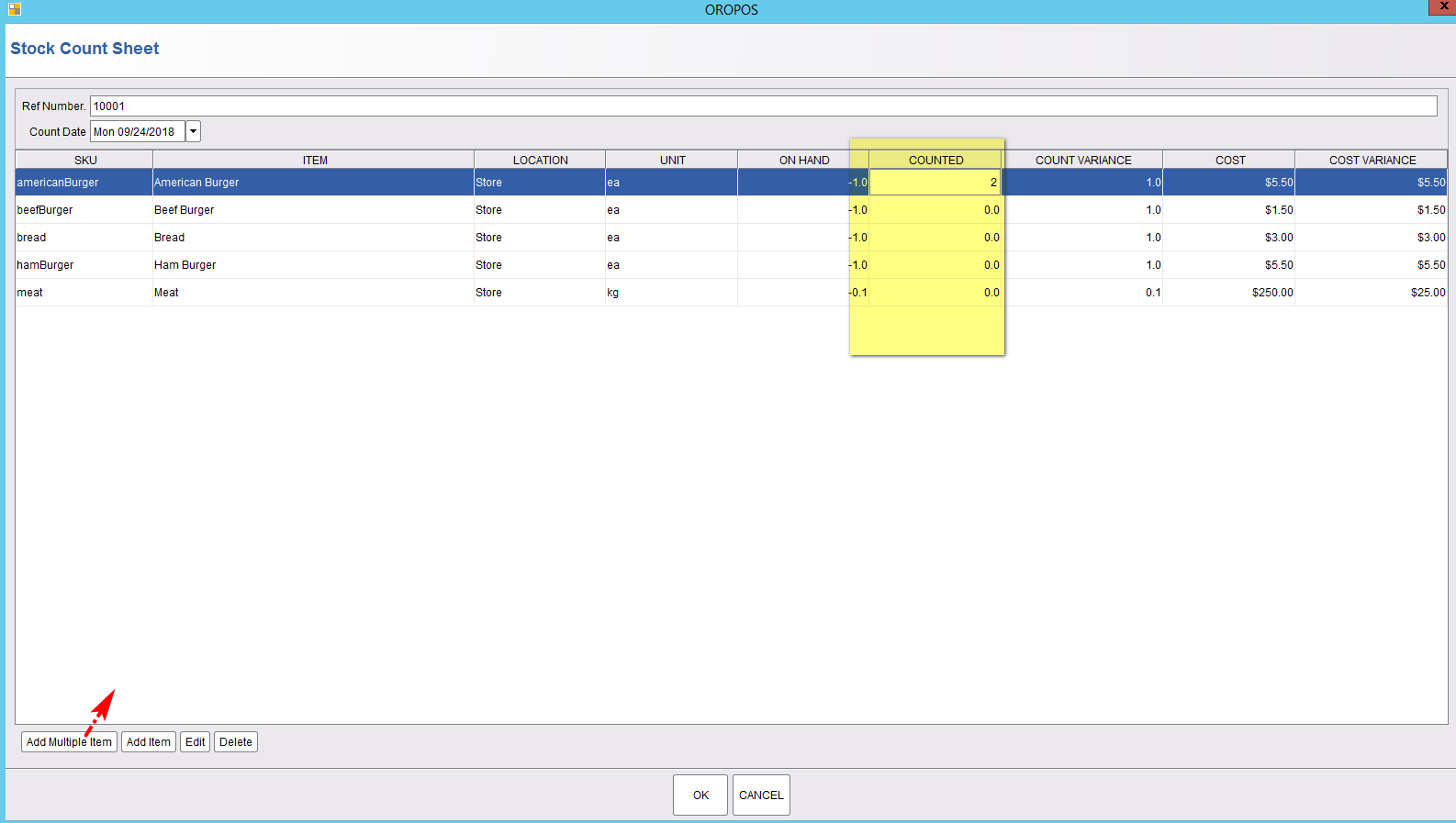
| 1️⃣ Create Sheet | Add items (one at a time or by group) |
| 2️⃣ Count + Update | Walk the store, count, enter actual quantities |
| 3️⃣ Verify + Apply | Authorized person reviews and confirms |
1️⃣ Step 1: Create the Stock Count Sheet
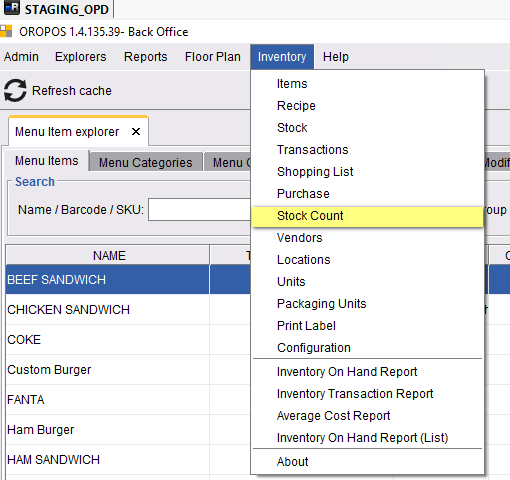
Path: Back-Office → Inventory → Stock Count → Create New
| Action | Tip |
|---|---|
| Add a single item | Useful for spot-checks |
| Add by Group (e.g., “Beverages”) | Faster — adds all items in one click |
| Scan barcode (with scanner) | Fastest — 1 second per item |
2️⃣ Step 2: Count and Update Quantities
Walk through your store, count each item, and type the actual count directly in the sheet.
Carry the Windows tablet around. Tap each item, type count. With a barcode scanner: scan, type count, move on.
3️⃣ Step 3: Verify and Apply
An authorized person (manager/owner) reviews the count and verifies it.
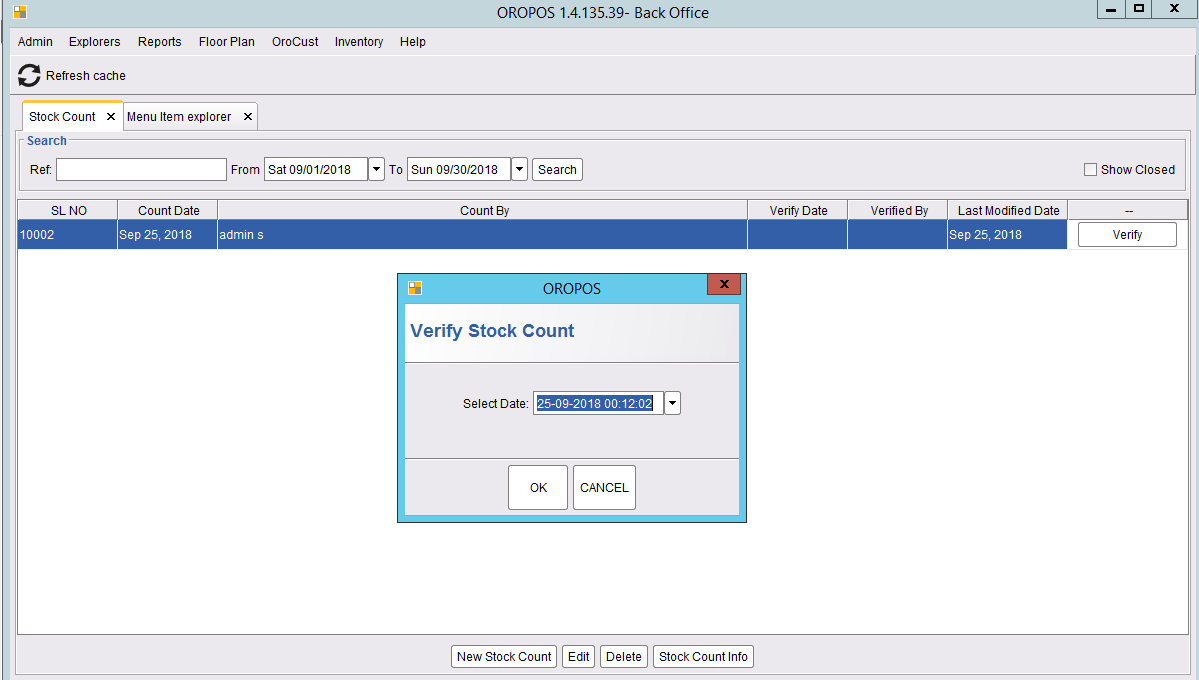
After verification:
- ✅ On-hand and available balance are updated
- 📝 System logs “ADJUST IN” or “ADJUST OUT” transactions for the differences
- 📊 Audit trail preserved for accounting
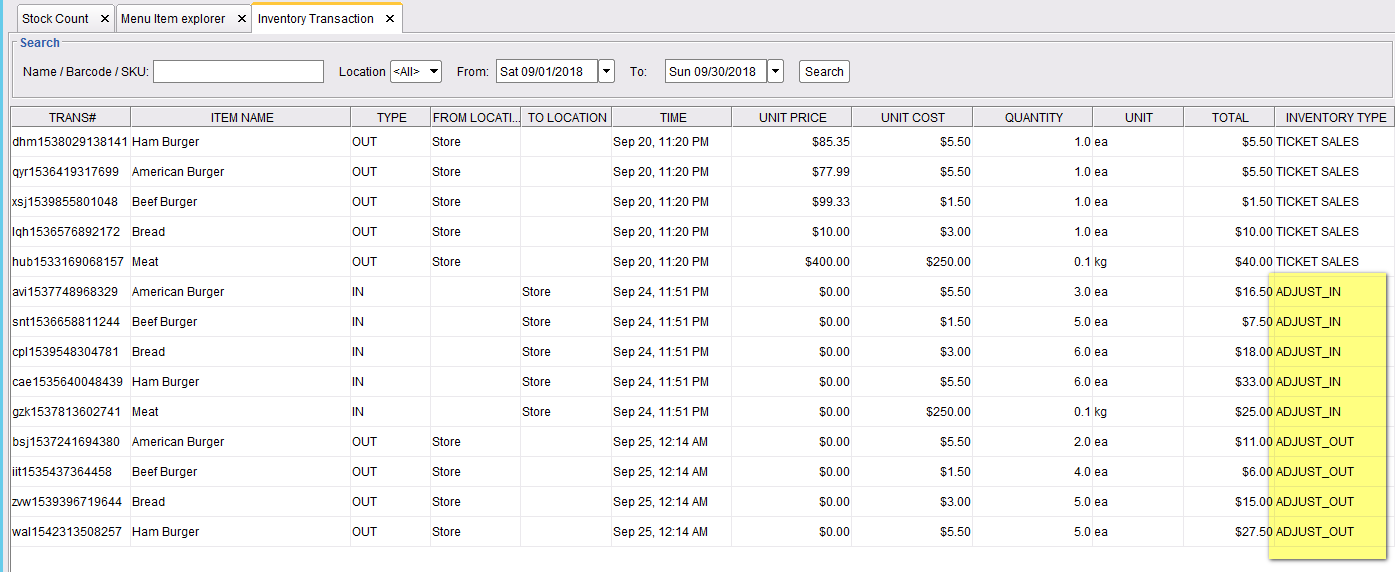
Only authorized users (manager+) should verify stock counts. This prevents staff from “fixing” their own theft.
🛒 Best For: Retail & Grocery
Stock counts are especially important in retail stores and grocery shops where:
- 📦 Inventory has thousands of SKUs
- 👥 Many customers handle products before buying
- 💸 Margins are thin — every unit matters
- 🚪 Shoplifting risk is real
- 🥶 Perishables go bad quickly
📌 Real Examples
| Business Type | Why Stock Count Matters |
|---|---|
| 🏪 Convenience Store | High shoplifting risk on cigarettes, batteries, candy |
| 🛒 Grocery | Track expiration / spoilage on perishables |
| 👕 Clothing Store | Track variants (size/color/style) — easy mix-ups |
| 🍷 Liquor Store | Required by law in many jurisdictions for tax compliance |
| 💊 Pharmacy | Regulated counts for controlled substances |
| 🐾 Pet Store | Track perishable food + small high-shrinkage items |
⭐ Best Practices
| Tip | Why |
|---|---|
| Count after closing hours or before opening | Stock doesn’t change while you’re counting |
| Use 2 people for high-value items | One counts, one types — fewer errors |
| Print the count sheet first | Backup if tablet dies |
| Use cycle counts instead of full annual counts | Less disruptive, more accurate |
| Count high-shrink items more often | Cigarettes, alcohol, electronics — weekly |
| Have a manager verify, not the counter | Separation of duties prevents fraud |
| Investigate large discrepancies | 5+ unit gaps need root-cause analysis |
| Use a barcode scanner | 3-5x faster than tapping each item |
📚 Related Guides
| → Stock In / Out | → On-Hand Report | → Barcode Labels |
📞 Need More Help?
Visit guide.orocube.com or contact helpdesk@orocube.net